Hey, Google’s Gemini Just Got a Wild Update — Let Me Break It Down for You
Since you’ve been digging into AI stuff lately, I figured you’d want the full scoop. Google rolled out a hefty Gemini update on August 13, and it’s pretty complex — especially on the privacy side. I did a deep dive so you don’t have to.
TL;DR — What You Need to Know
In short, Gemini can now remember your past chats for better personalization, but starting September 2 any files you upload might be used to train Google’s AI. On the bright side, there’s also a “Temporary Chat” mode that keeps things truly private, so you’ll need to juggle the two.
Knowing you hate vague claims, I’m keeping this evidence-based and super concrete.
New Feature 1: Temporary Chat (legit useful)
Think of this as incognito mode for Gemini:
- Auto-deletes after 72 hours
- Never shows in chat history
- Not used for AI training
- Doesn’t influence future conversations
Just click the hollow chat-bubble icon next to “New Chat.” Great for sensitive questions or one-off brainstorming.
New Feature 2: Personal Context (mixed bag)
Total double-edged sword. Gemini now learns from old chats to tailor answers.
Upsides
- No need to repeat background info
- Replies match your interests and projects
- Keeps conversation context straight
Watch-outs
- On by default (yeah, really)
- Still unavailable in EEA, UK, Switzerland due to GDPR
- You have to toggle it off manually if you’re not cool with it
The September 2 Bombshell (biggest concern)
Here’s where it gets dicey: if Keep Activity (formerly “Gemini Apps Activity”) is ON, then files, photos, and videos you upload after September 2 can be sampled for AI training.
Evidence-Based Privacy Issues
- Opt-out model: Default is sharing on; you must turn it off
- Human reviewers: Some chats stored up to three years for quality checks
- Regional gaps: GDPR regions get stricter defaults, everyone else doesn’t
Experts prefer opt-in consent, so this is eyebrow-raising.
My Recommended Settings (step-by-step)
Maximum privacy
- In
gemini.google.com, turn Keep Activity OFF - Double-check audio & Live-recording settings (off by default)
- Use Temporary Chat for anything sensitive
- Purge old activity if needed
Balanced convenience
- Leave Keep Activity ON for handy history
- Keep Personal Context ON for now, but monitor
- Avoid uploading key files after Sept 2
- Review & delete data regularly
Extension Tweak (nice bonus)
Since July 7, Phone, Messages, WhatsApp, and Utilities extensions work even if activity logging is off — no extra permission hoops.
Quick Privacy Impact Snapshot
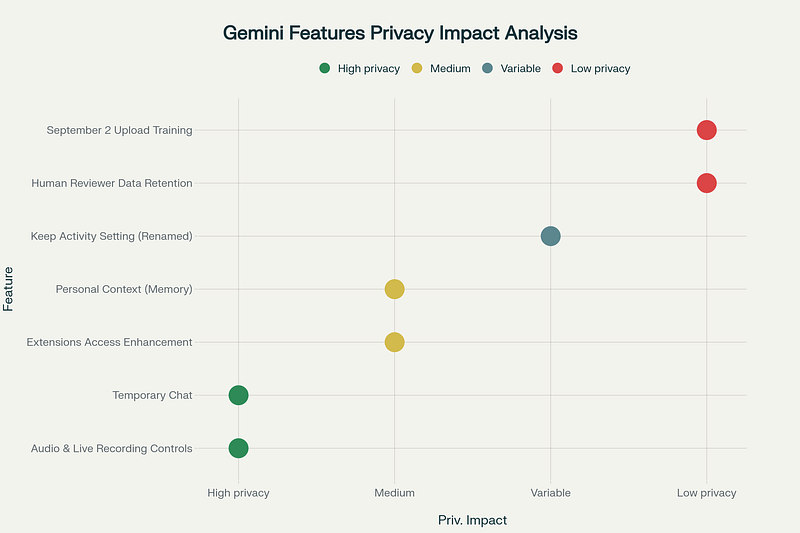
Privacy impact analysis of Gemini’s new features and data controls
That chart makes it obvious: Temporary Chat and the new audio controls are high-privacy, while September 2 uploads and long-term human review are low-privacy.
Final Take
Bottom line, transparency is up, but the default settings aren’t on our side. Check your toggles before September 2, test out Temporary Chat, and decide how much you trust Gemini moving forward. Holler if anything’s fuzzy — we’ll figure it out together.
コメントを残す