What is Google Gemini Canvas? Features, Capabilities, and Usage Guide
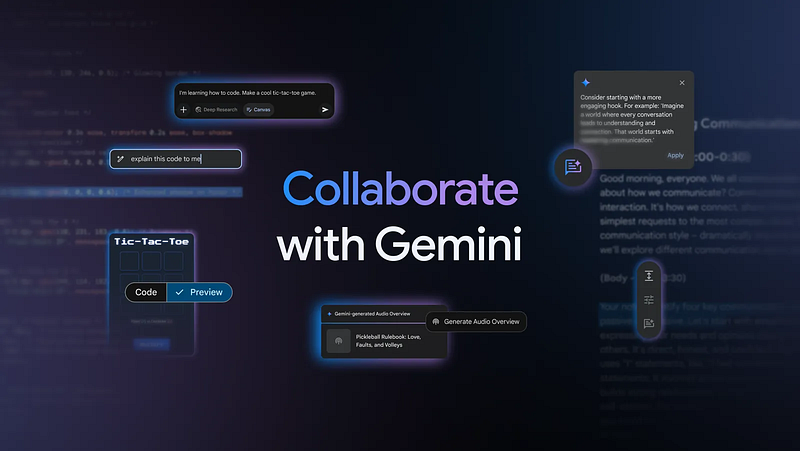
On March 18, 2025, Google introduced a revolutionary feature called “Canvas” for its AI chatbot, Gemini. With this addition, Gemini transforms from a simple conversational AI into a robust productivity tool capable of advanced writing and coding tasks.
In this article, we’ll dive deep into Google Gemini Canvas, exploring its key features, practical use cases, and benefits.
What is Gemini Canvas?
Gemini Canvas is an interactive workspace within the Gemini AI chatbot where users can create, edit, and share documents and code in real-time.
Previously, Gemini was primarily a chat-based assistant. With Canvas, Gemini now seamlessly supports complex tasks like drafting documents and writing code. Similar platforms from competitors include OpenAI’s Canvas for ChatGPT and Anthropic’s Artifacts, but Gemini Canvas uniquely integrates with Google’s existing ecosystem, offering enhanced compatibility and productivity.
Canvas can be accessed from the Gemini app on both web and mobile platforms, available globally for both standard and Gemini Advanced subscribers. Notably, the feature is also available for free users in Japan.
Key Features and Interface of Gemini Canvas
Canvas offers a split-screen interface, with the Gemini chat area on the left and the generated content (documents or code) on the right. This design enables users to clearly visualize changes in real-time while maintaining a natural workflow.
Document Creation and Editing Features
Gemini Canvas enhances document creation through the following features:
- Generates high-quality first drafts from simple user prompts.
- Provides real-time feedback and suggestions directly from Gemini.
- Allows highlighting specific paragraphs or sections for targeted editing.
- Offers options to adjust tone, length, and formatting quickly.
- Facilitates direct export of documents to Google Docs for easy collaboration.
These capabilities streamline the creation of essays, blog posts, speeches, and business reports.
Enhanced Coding and Development Capabilities
Another significant strength of Gemini Canvas is its coding support, making it particularly beneficial for both professional developers and beginners learning programming.
Canvas supports a variety of coding tasks, including:
- Instant prototyping and rapid code generation from ideas.
- Real-time previews of HTML, CSS, JavaScript, React, and Python projects.
- Interactive debugging and iterative improvement based on immediate feedback.
- Integrated file management and version tracking within projects.
For instance, users can instruct Gemini Canvas to create a web form. The tool immediately generates the necessary HTML and displays a real-time preview. Further commands such as “add input fields” or “insert buttons” are instantly reflected in both the code and visual preview.
Practical Use Cases of Gemini Canvas
Gemini Canvas shines particularly in the following scenarios:
① Accelerating Prototyping and Development
Developers can rapidly prototype web apps, games, or interactive projects without switching between multiple apps or IDEs. This drastically improves workflow efficiency.
② Educational Support for Programming
Beginners benefit greatly from real-time visual feedback, enhancing their learning experience as they experiment and modify code directly in Canvas.
③ Efficient Document Creation and Team Collaboration
Canvas simplifies drafting collaborative documents or presentations. The seamless integration with Google Docs further facilitates efficient team collaboration and workflow.
Additional New Feature: Audio Overview
Alongside Canvas, Google also introduced “Audio Overview,” which converts text documents into podcast-style AI conversations. Currently available in English, this feature is expected to expand into more languages soon.
Conclusion: The Evolution of Gemini with Canvas and Future Prospects
With the introduction of Canvas, Google Gemini has evolved significantly, transitioning from a simple chat-oriented AI into a powerful productivity suite for practical and educational uses.
Canvas’s compatibility with Google’s existing tools and its real-time editing and feedback differentiate it from other AI tools. As additional languages and new features are rolled out in the future, Gemini Canvas is undoubtedly a development worth watching.
Try Gemini Canvas today to bring more creativity and efficiency to your writing and coding tasks!
Hashtags:
#GoogleGemini #GeminiCanvas #GenerativeAI #AITools #ProductivityBoost #AIWriting #CodingAssistant #AIforEducation #AIInnovation #RealtimeEditing #CanvasFeature #TechTrends
コメントを残す