“2025 DevStack: The Ultimate AI Workflow Blueprint for Engineers”
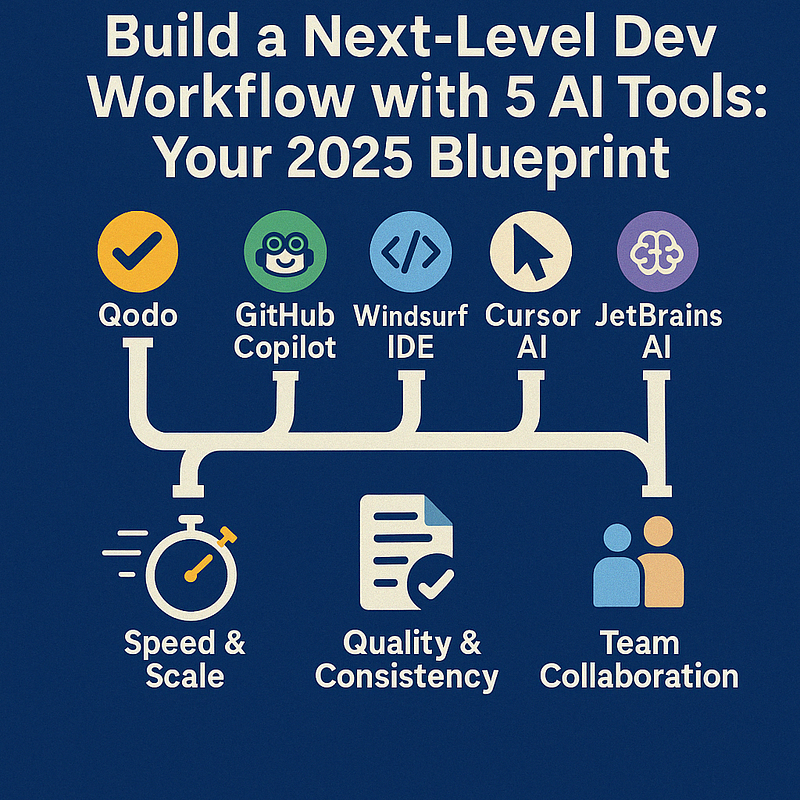
In 2025, top-tier developers aren’t just coding — they’re orchestrating an ecosystem of AI tools that slash development cycles by 50–70%, enhance code quality, and supercharge team collaboration. Ready to join them? This article reveals a proven blueprint for integrating Qodo, GitHub Copilot, Windsurf IDE, Cursor AI, and JetBrains AI Assistant into a single, seamless workflow.
Why a Unified AI Workflow Matters
- Speed & Scale: With the right AI stack, teams report delivering features 70% faster while maintaining enterprise-level reliability.
- Quality & Consistency: Automated testing, security checks, and architectural validations minimize errors and technical debt.
- Team Collaboration: Intelligent agents handle repetitive tasks, freeing humans to focus on creativity and big-picture decisions.
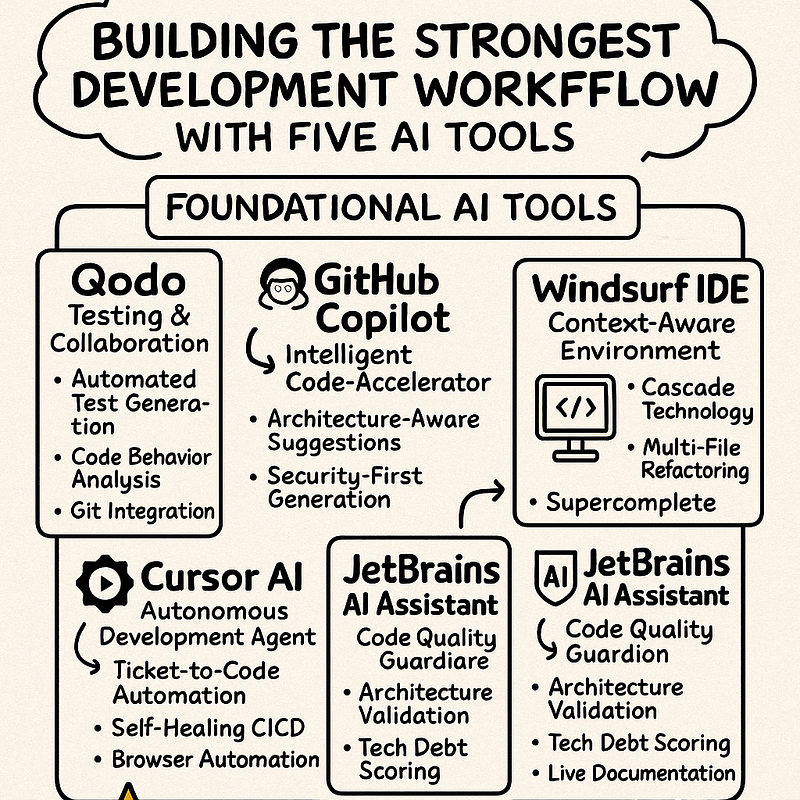
1. Qodo: The Testing & Collaboration Dynamo
Core Features
- Automated Test Generation: Hits 98% code-path coverage, shrinking manual testing time by 65%[1].
- Code Behavior Analysis: Uses probabilistic modeling to catch tricky edge cases.
- Seamless Git Integration: Automated pull request reviews, conflict alerts before they reach CI/CD pipelines.
Pro Tip: Configure Qodo’s “Merge PR-Agent” to enforce your custom coding standards. This prevents style and quality issues before merging.
2. GitHub Copilot: The Intelligent Code Accelerator
2025 Highlights
- Architecture-Aware Suggestions: Completes code based on your microservices, serverless stacks, or layered app architecture[3][9].
- Security-First Generation: Integrates OWASP Top 10 checks for real-time vulnerability detection[3].
- Auto-Documentation Sync: Updates API docs (e.g., Swagger) alongside code changes[4].
Case Study: A fintech firm reduced its security patch cycle from two weeks to 2.3 hours by leveraging Copilot’s integrated security scanning[9].
3. Windsurf IDE: The Context-Driven Development Environment
What Sets It Apart
- Cascade Technology: Retains project-wide awareness across multiple files, cutting redundant queries by 83%[9].
- Multi-File Refactoring: Safely modifies codebases over 1M lines without breaking dependencies.
- Supercomplete: Predicts your next move with 92% accuracy by analyzing time-based coding patterns.
Usage Tip: Use Cmd + I to trigger natural language commands like “Refactor class components to React Hooks,” letting Windsurf handle the heavy lifting.
4. Cursor AI: Your Autonomous Dev Sidekick
Standout Capabilities
- Ticket-to-Code Automation: Converts Jira tickets into production-ready pull requests, hitting a 78% first-pass approval rate[2].
- Self-Healing CI/CD: Diagnoses failing pipelines and proposes fixes in real-time by analyzing logs[2].
- Browser Automation: Simultaneously tests frontend changes across 15+ device profiles[9].
Pro Tip: Activate “Coffee Mode” to let Cursor tackle repetitive tasks — like code scaffolding or routine bug fixes — while you focus on higher-level architecture.
5. JetBrains AI Assistant: The Code Quality Guardian
How It Polishes Your Code
- Architecture Validation: Auto-flags any violations of SOLID or other design principles[9].
- Tech Debt Scoring: Grades your codebase with 12 maintainability metrics, surfacing trouble spots fast[9].
- Live Documentation: Generates UML diagrams on the fly to keep your team in sync[9].
Success Metric: Teams using JetBrains’ debt scoring reduced critical refactoring backlog by 40% per quarter[9].
Putting It All Together: Your 4-Phase Integration
- Planning
- JetBrains evaluates requirements and calculates technical debt risk.
- Qodo auto-generates testing plans from user stories.
- Implementation
- Copilot offers code aligned with Windsurf’s project context.
- Cursor autonomously implements non-critical features based on Jira tickets.
- Validation
- Qodo runs AI-generated tests on all major runtime environments.
- Windsurf cross-references CVE databases for security issues.
- Deployment
- Cursor refines CI/CD pipelines via reinforcement learning.
- JetBrains monitors real-time performance and flags any architecture drift.
Advanced Tactics for Pro Teams
Multi-Tool Prompt Chaining
- JetBrains: “Design REST API for inventory management.”
- Copilot: “Implement Spring Boot controller with JPA.”
- Windsurf: “Add OpenAPI annotations.”
- Qodo: “Generate load tests for Postman collection.”
- Cursor: “Deploy to AWS ECS using Terraform.”
Context Management Framework
- Windsurf: Maintains the big-picture code context.
- Cursor: Handles infrastructure state.
- JetBrains: Oversees architecture rules.
- Qodo: Governs testing constraints.
- Copilot: Focuses on immediate code suggestions.
Real-World ROI
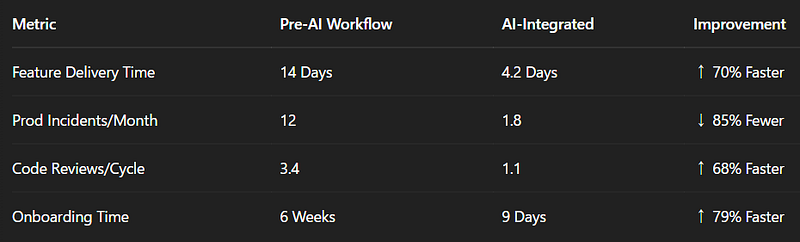
Maintaining Your AI Stack
- Monthly Tool Audit: Check logs to see which AI suggestions get accepted or rejected.
- Refine Context Settings: Adjust how much each tool “sees” of your codebase.
- Evolve Quality Gates: Revisit unit test thresholds, complexity metrics, and more as your codebase grows.
Emerging Trends
- AI Orchestration: Using orchestrators like LangGraph to manage tool-to-tool communication[2].
- Context Federation: Sharing partial or full context among Qodo, Copilot, etc.[9].
- Ethical & Bias Checks: Screening for unwanted bias in AI-suggested code[9].
Final Word
By weaving Qodo, Copilot, Windsurf, Cursor, and JetBrains AI into a cohesive toolchain, development teams can cut delivery times in half (or more) without sacrificing quality. In 2025, the real winners are those who conduct these AI “ensembles” like a symphony — uniting speed, precision, and creativity in their day-to-day workflow.
Enjoyed this deep dive?
Follow me for weekly insights on future-proof dev strategies. Let’s unlock the full power of AI in software engineering — together!
👉 If you found this blueprint helpful, follow me for more AI-powered development strategies and case studies. I post weekly insights that help engineering teams thrive in 2025 and beyond.
References
[1] Qodo.ai Blog: Best AI Coding Assistant Tools
[2] GitHub: NirDiamant/GenAI_Agents
[3] KDnuggets: Top 5 AI Coding Assistants You Must Try
[4] LinkedIn: Integrating AI Tools in Your Development Workflow
[9] PragmaticCoders: AI Developer Tools
…and more sources listed in the original references above.
Disclaimer: Tool performance and results vary by project scope and codebase complexity.
#AIProgramming#DevWorkflow2025#ProductivityTools#SoftwareEngineering#AIinDevOps
コメントを残す