
Claude Code Became the #1 AI Coding Tool in 8 Months. Here’s Why I’m Not Surprised.
By S | AI Director & Freelance Creator, rural Japan
Hello, this is S.
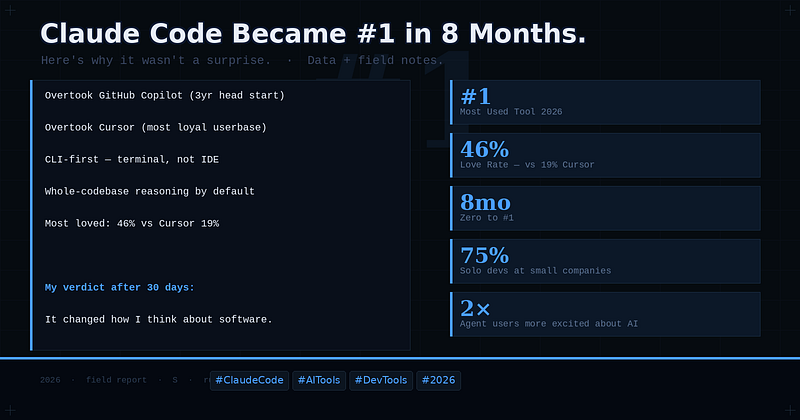
Eight months. That’s how long it took Claude Code to go from zero to the most-used AI coding tool among software engineers — overtaking GitHub Copilot, which had a three-year head start, and Cursor, which had the most loyal user base in the space.
I’ve been using Claude Code since it launched. I wasn’t surprised by the data. But I want to explain exactly why, because the reason matters for how you think about AI tools going forward.
The Numbers First
The Pragmatic Engineer’s 2026 survey of nearly 1,000 engineers found Claude Code at the top of the stack: most used, and most loved at 46%, more than double Cursor’s 19% and more than five times GitHub Copilot’s 9%. Among small companies and solo developers, the numbers are even more stark — 75% of engineers at the smallest firms now use Claude Code as their primary tool.
This is not a niche result. It reflects a genuine shift in how engineers want to work with AI.
What Makes Claude Code Different
The surface-level answer is “it reads the whole codebase.” That’s true, and it matters. But the deeper answer is about what kind of intelligence it applies to that context.
Most AI coding tools are optimized for generation speed — how fast can they produce a syntactically valid code block that looks plausible. Claude Code is optimized for something different: coherence across a project. When I ask it to refactor a component in the Life RPG dashboard, it doesn’t just rewrite that file. It checks what other files import from it, what state assumptions downstream components make, and what tests exist. It reasons about the change as a system, not as a local edit.
This is the difference between a tool that helps you type faster and a tool that helps you think better.
The CLI Paradox
Claude Code is a command-line tool. In 2026, when every other product is racing to build the most polished GUI, Anthropic shipped a terminal interface — and it became the most loved tool in the category.
This seems counterintuitive until you realize who actually buys into it: engineers who are serious about their workflow. The CLI isn’t a limitation. It’s a filter. It attracts users who care about control, composability, and depth over convenience.
Those users also write the articles, give the talks, and influence the purchasing decisions at their companies. The CLI-first approach wasn’t a compromise — it was a positioning decision that self-selected for the highest-value users.
Where It Still Falls Short
I use Claude Code daily, and I want to be precise about its limits.
It has no inline autocomplete. If you’re in flow state and want suggestions appearing as you type, Claude Code doesn’t offer that. For UI-heavy work where you’re making small, rapid edits, the round-trip to the terminal breaks rhythm. This is why I still use Cursor alongside it.
It also struggles with very large monorepos where the context, even when indexed, creates noise. The signal-to-noise ratio degrades past a certain codebase size, and responses become less precise.
These are real limitations. They don’t change the overall picture, but they explain why 70% of engineers use multiple tools simultaneously.
What the #1 Ranking Actually Means
Here’s the thing about Claude Code reaching #1: it didn’t win by being better at the thing existing tools already did. It won by doing something existing tools weren’t designed to do — reasoning about software as a whole system rather than as a sequence of local edits.
That’s a different category of capability. And it’s why the engineers who use it most are twice as likely to be excited about AI as those who don’t.
The tool changed how they think about what AI can do in a software project. That’s a harder thing to build than autocomplete, and a harder thing to copy.
My Recommendation
If you’re a solo developer or work on a small team: start with Claude Code. The learning curve is real but short. Within a week, the CLI workflow will feel natural, and you’ll start seeing the codebase reasoning in action.
If you’re already using Cursor: don’t switch — add. Use Claude Code for architecture, refactoring, and complex debugging. Keep Cursor for UI iteration and flow state work. The combination is more powerful than either alone.
If you’re at a large enterprise using Copilot: Claude Code is what your staff-level engineers are already using on the side. The survey data shows this clearly. It’s worth evaluating as a complement to your existing stack.
I publish weekly field reports on AI tools from a solo developer perspective in rural Japan. If you’re building developer tools and looking for an honest reviewer with a real audience, reach out via Medium or johnpascualkumar077.github.io/portfolio/
— –
If this was useful, follow me here on Medium.
I’m S — a content creator and AI practitioner based in rural Japan (Shimane Prefecture). I publish practical, honest takes on AI tools, content monetization, and what it actually looks like to build income with these tools from outside a major city.
[Follow →](https://medium.com/@johnpascualkumar077)
Tags: Claude Code AI Tools Software Development Developer Productivity Vibe Coding 2026

コメント