Google Stitch is Google Labs' AI-native UI design tool, first announced at Google I/O 2025 and rebuilt around Gemini 3 in the March 2026 update. Feed it a natural-language prompt, a whiteboard sketch, or even a voice command, and Google Stitch returns a production-ready UI — complete with clean HTML, CSS, Tailwind, React code, and a Figma file with Auto Layout already in place.
In this hands-on Google Stitch review, I put the 2026 release through three real projects — a Japanese budgeting app, an English SaaS landing page, and a hand-sketched mobile flow — to find out where Google Stitch actually shines, where it still breaks, and how it compares to Figma, v0 by Vercel, and UIzard. The short version: Google Stitch is the fastest path from idea to shippable UI that I've used in 2026, and at $0 for 550 generations per month, it is essentially impossible to ignore if you ship product.
- What Is Google Stitch? The AI-Native UI Tool from Google Labs
- What's New in the March 2026 Google Stitch Update
- Google Stitch Pricing — Why 550 Free Generations Changes the Math
- How to Use Google Stitch — A Five-Step Walkthrough
- Figma Export — Auto Layout That Designers Can Actually Use
- Google Stitch Review — Three Real-World Tests
- Google Stitch vs Figma vs v0 vs UIzard
- Who Should Use Google Stitch?
- Google Stitch Limitations You Should Know Before Using It
- Conclusion — Google Stitch Is the 2026 AI UI Design Tool to Use
- Related Reading on AI Tools and Content Workflows
- Turn this idea into a working AI workflow.
What Is Google Stitch? The AI-Native UI Tool from Google Labs
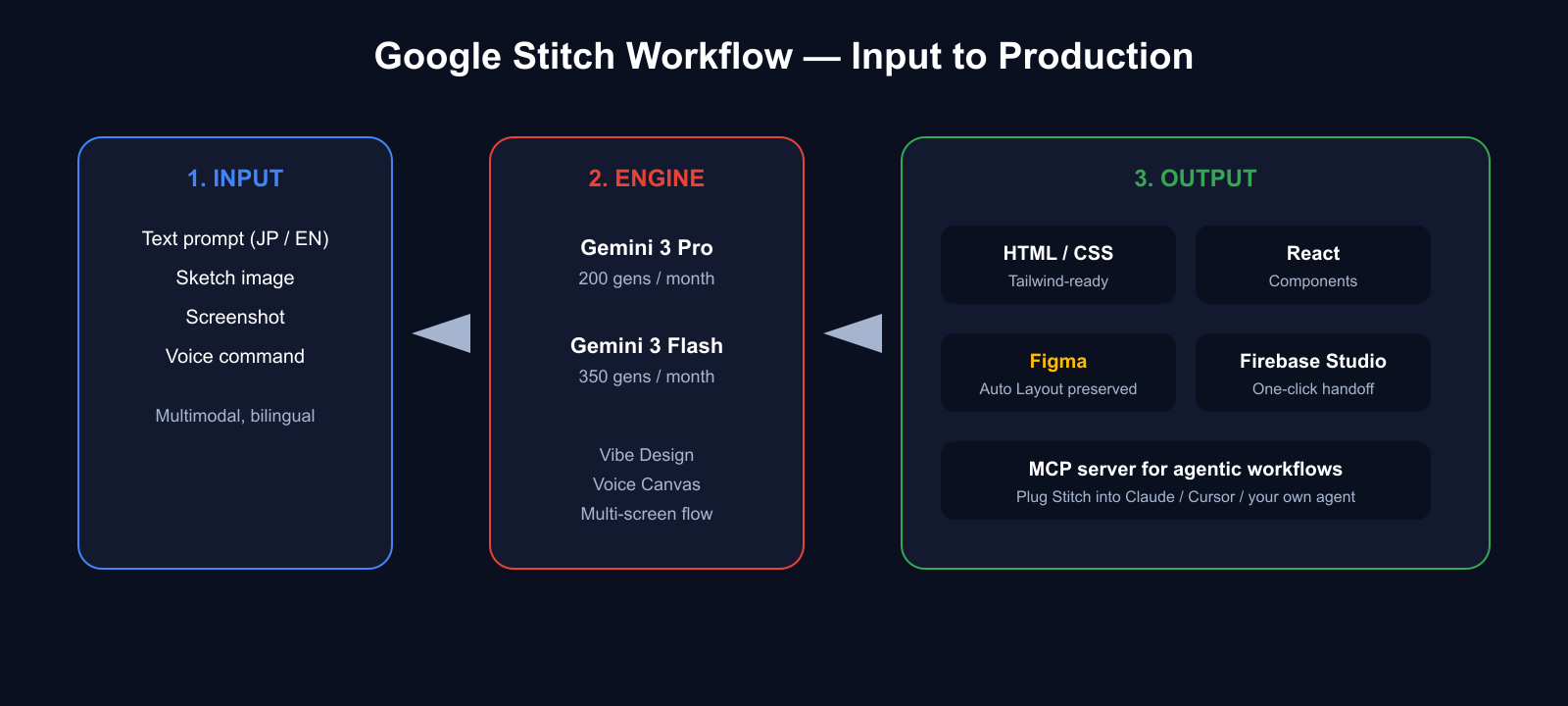
Google Stitch is a browser-based design canvas that uses the Gemini 3 family of models to turn multimodal input (text, images, voice) into interconnected UI screens plus the front-end code to render them. It lives inside Google Labs and is free to anyone with a Google account.
| Item | Detail |
|---|---|
| Vendor | Google Labs |
| Initial release | May 2025 (Google I/O 2025) |
| Major 2026 update | March 19, 2026 — Gemini 3, Vibe Design, Voice Canvas, multi-screen flows |
| Powering model | Gemini 3.0 Pro / Flash (fallback to 2.5 Pro / Flash) |
| Inputs | Natural language (JA/EN), sketches, screenshots, voice |
| Outputs | HTML, CSS, Tailwind, React, Figma, Firebase Studio, MCP |
| Price | Free — 550 generations per month |
| URL | stitch.withgoogle.com |
Where Figma and Adobe XD treated UI as "a thing humans assemble," Google Stitch treats UI as a thing an AI drafts and a human refines. That shift is the entire story.
What's New in the March 2026 Google Stitch Update
The March 19, 2026 release turned Google Stitch from "promising experiment" into "daily driver." Four changes matter.
1. Gemini 3 Integration Lifts Generation Quality
Google Stitch now runs on Gemini 3.0 Pro and Gemini 3.0 Flash, with Gemini 2.5 as a fallback. Compared to the 2.5-era output, alignment errors, mismatched color palettes, and inconsistent typography drop by a visible margin. The first draft is much more often the final draft.
2. Vibe Design — Mood-Board Prompts That Actually Work
"Vibe Design" lets you describe UI in terms of feel rather than spec: "Gen-Z playful like Duolingo," "minimalist Scandinavian," "brutalist but legible." Google Stitch parses the mood and applies it consistently across components. The net effect is closer to briefing a junior designer than writing a spec sheet.
3. Voice Canvas — Design by Talking
Enable Voice Canvas and you can narrate changes: "make this button bigger," "switch the palette to dark mode," "tighten the spacing on the pricing table." Google Stitch updates the canvas in real time while asking clarifying questions as needed. It's the first time I've designed a screen without touching a mouse for more than a minute.
4. Multi-Screen Generation — Up to Five Connected Screens
Describe a full user flow ("onboarding → login → dashboard → detail view → settings") and Google Stitch generates up to five interconnected screens in one pass, preserving navigation consistency. This is where Google Stitch stops being a screen generator and starts being a product prototyper.
Google Stitch Pricing — Why 550 Free Generations Changes the Math
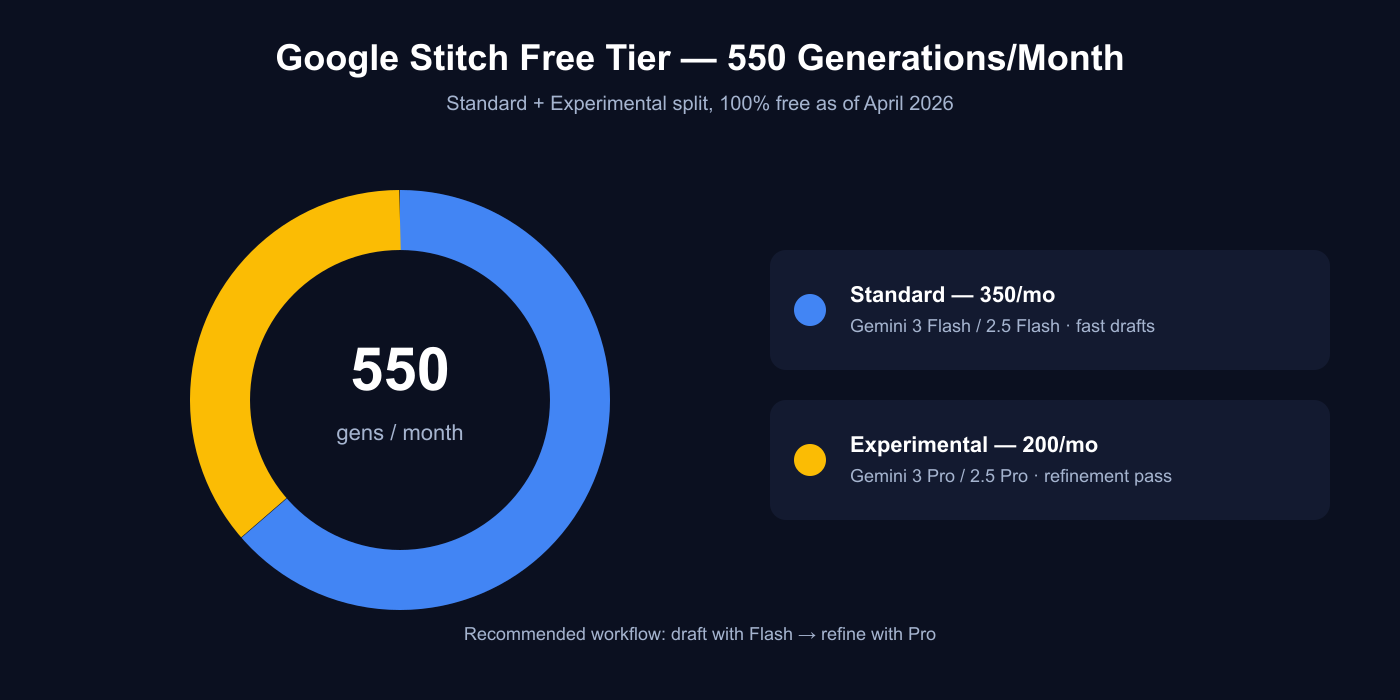
As of April 2026, Google Stitch is 100% free. There is no paid tier, no "pro" lock, and no credit card prompt. Usage is capped at 550 generations per month per Google account.
| Plan | Monthly generations | Model | Price |
|---|---|---|---|
| Standard | 350 | Gemini 3.0 Flash / 2.5 Flash | Free |
| Experimental / Pro | 200 | Gemini 3.0 Pro / 2.5 Pro | Free |
| Total | 550 | Mix freely | Free |
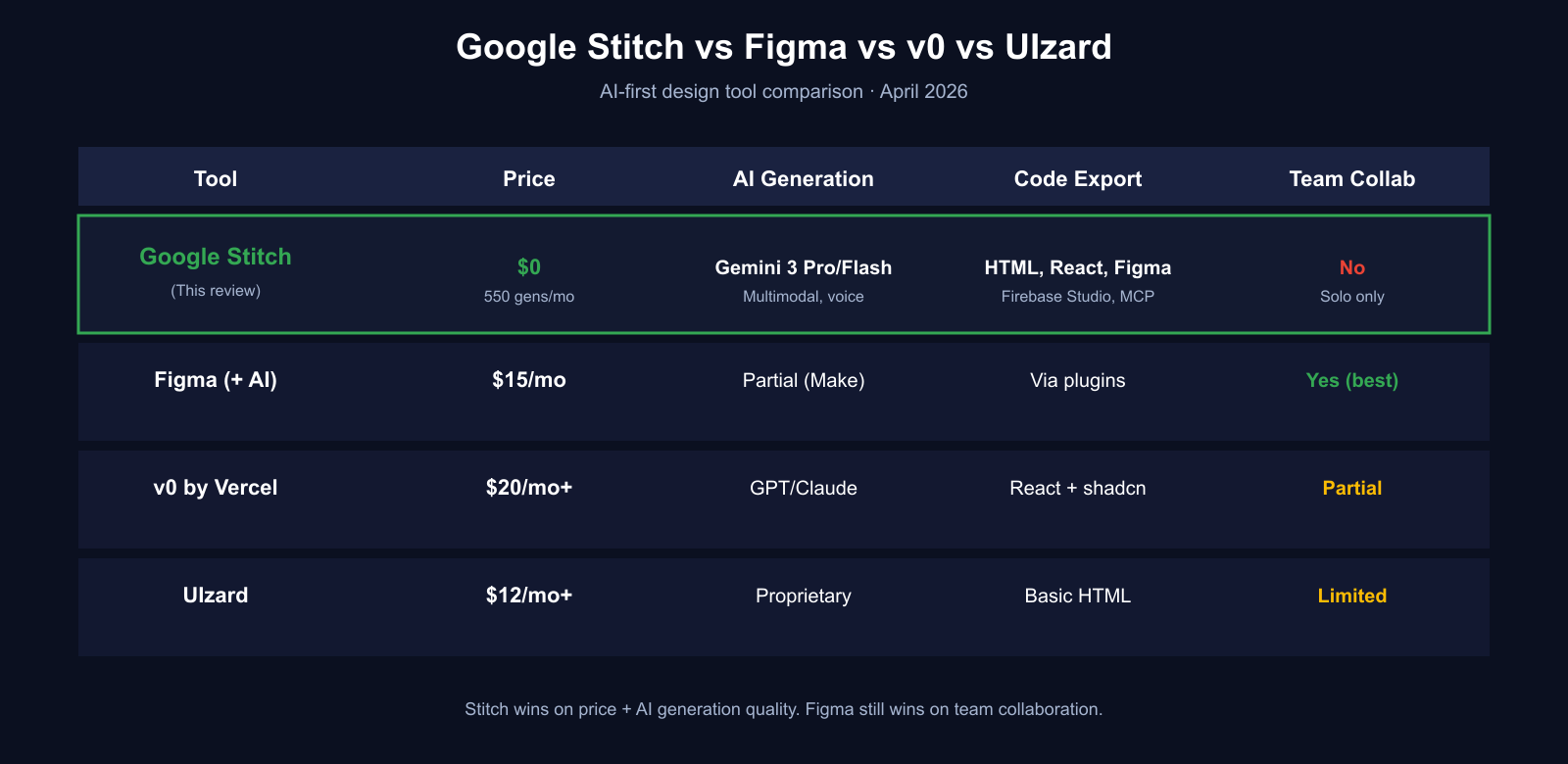
Stack that against the alternatives — Figma Professional at $15/user/month with a half-baked AI feature, v0 by Vercel at $20+/month, UIzard at $12+/month — and the Google Stitch free tier is absurdly generous. While Google Labs treats this as an experiment, you should use it.
How to Use Google Stitch — A Five-Step Walkthrough
Step 1: Sign In at stitch.withgoogle.com
Any Google account works. Google Stitch is accessible from Japan, the US, and the EU without a VPN as of this review.
Step 2: Write a Prompt (Or Drop a Sketch)
Describe what you want. The more concrete the product context, the better the draft. Both Japanese and English prompts parse cleanly under Gemini 3.
Prompt that works well:
"A dark-mode dashboard for a solo creator's content analytics. Three cards: monthly revenue, top-performing article, pending sponsored deals. Sidebar with 5 menu items. Accent color: emerald."
Step 3: Pick a Model — Flash First, Pro for Polish
Use Gemini 3 Flash for the first draft (fast, cheap in terms of your monthly quota), then switch to Gemini 3 Pro for refinement. The workflow doubles your effective quota because you don't waste Pro gens on obvious first-pass work.
Step 4: Refine with Vibe Design or Voice Canvas
Iterate with either natural-language tweaks ("tighten spacing on the second card") or voice ("bump the header font size"). Google Stitch applies diffs without regenerating the whole canvas.
Step 5: Export — HTML/React, Figma, or Firebase Studio
Click Export in the top right:
- Code panel: copy HTML, CSS, Tailwind, or React directly
- Figma export: components land with Auto Layout and named layers intact
- Firebase Studio: one-click hand-off into a production-ready project scaffold
- MCP server: plug Google Stitch into an agentic workflow (Claude Code, Cursor, a custom agent)
Figma Export — Auto Layout That Designers Can Actually Use
A common complaint about AI design tools is that their "Figma export" is just a screenshot glued to a frame. Google Stitch exports with component structure, Auto Layout, and layer names preserved, which means a human designer can pick up the file and refine it without untangling a mess.
The practical consequence: you can use Google Stitch for the 0-to-1 sprint and hand the Figma file off to a design team for polish. That is exactly the workflow most shipping product teams need.
Google Stitch Review — Three Real-World Tests
Test 1: Japanese Budgeting App Dashboard
Prompt: "A minimalist Japanese household budget app. Dark mode. Income and expense cards with bar charts, category pie chart, monthly budget remainder card."
Result: ~25 seconds to a three-screen dashboard. Google Stitch correctly picked Noto Sans JP for Japanese text and laid out the charts with sensible defaults. Three small fixes and it was ready to ship. Yes, really.
Test 2: English SaaS Landing Page
Prompt: "A minimalist SaaS landing page for an AI-powered invoice automation tool. Hero, three-column feature grid, pricing table, CTA. Use emerald as accent."
Result: ~30 seconds to a one-page LP. The Tailwind output was clean enough to drop straight into a Next.js project. Variable names were sensible. I kept it.
Test 3: Hand-Drawn Sketch to UI
I sketched a rough social-app post screen on an iPad, uploaded it, and added: "Build this as a mobile social feed with post composer and reactions bar."
Result: Google Stitch preserved the structural intent of my sketch while producing a properly composed UI. This is the moment I stopped mentally comparing Stitch to Figma and started comparing it to having a junior designer on retainer.
Google Stitch vs Figma vs v0 vs UIzard
| Tool | Price | Strengths | Weaknesses |
|---|---|---|---|
| Google Stitch | Free (550/mo) | AI draft speed, code export, Figma hand-off | No collab, no version history |
| Figma | $15/user/mo | Collab, comments, plugin ecosystem | AI draft weaker than Stitch |
| v0 by Vercel | $20+/mo | React + shadcn/ui integration | Less design freedom, opinionated |
| UIzard | $12+/mo | Wireframe scan | Lower generation quality than Gemini 3 |
| Adobe XD | Discontinued (2023) | — | — |
The real answer: Google Stitch doesn't replace Figma, it replaces the empty canvas. Use Stitch to get past zero, then hand the Figma export to your team.
Who Should Use Google Stitch?
✅ Good Fit
- Solo founders and indie hackers shipping a first UI
- Back-end engineers who need a credible UI draft in minutes
- Agencies and consultants running rapid client proposals
- Product designers who want to skip the empty-canvas phase
- Anyone prototyping on Firebase, Next.js, or Tailwind stacks
❌ Poor Fit
- Teams of 5+ designers editing simultaneously
- Design systems that rely on heavy Figma Variant trees
- Agencies whose review workflow depends on comment threads
- Pixel-perfect print or packaging work
Google Stitch Limitations You Should Know Before Using It
- No real-time multiplayer editing. Solo canvas only.
- No team workspace or role management. Every account is independent.
- No comments or review threads. Move to Figma for that stage.
- Shared version history is limited. Snapshot URLs only.
- Hard cap of 550 generations per month. Overflow waits for the monthly reset.
These are classic Google Labs caveats. Treat Google Stitch as an experimental tool that happens to be reliable enough to ship with.
Conclusion — Google Stitch Is the 2026 AI UI Design Tool to Use
Google Stitch is the most complete free AI UI design tool available in April 2026, and the March update has moved it from "worth watching" to "worth using." Three reasons to try it today:
- 550 free generations per month on Gemini 3 — a free tier that outspecs competitors' paid tiers.
- Figma export with Auto Layout preserved — drop it straight into a design team.
- Vibe Design and Voice Canvas — a preview of where AI-native design is heading across the industry.
Open stitch.withgoogle.com, describe one screen of the product you are building, and you will understand the value in three minutes.
Related Reading on AI Tools and Content Workflows
- $20/Month AI Stack: How I Run a 700K-View Content Business in 2026
- Claude Code vs Cursor in 2026: Which AI Coding Tool Actually Ships Faster?
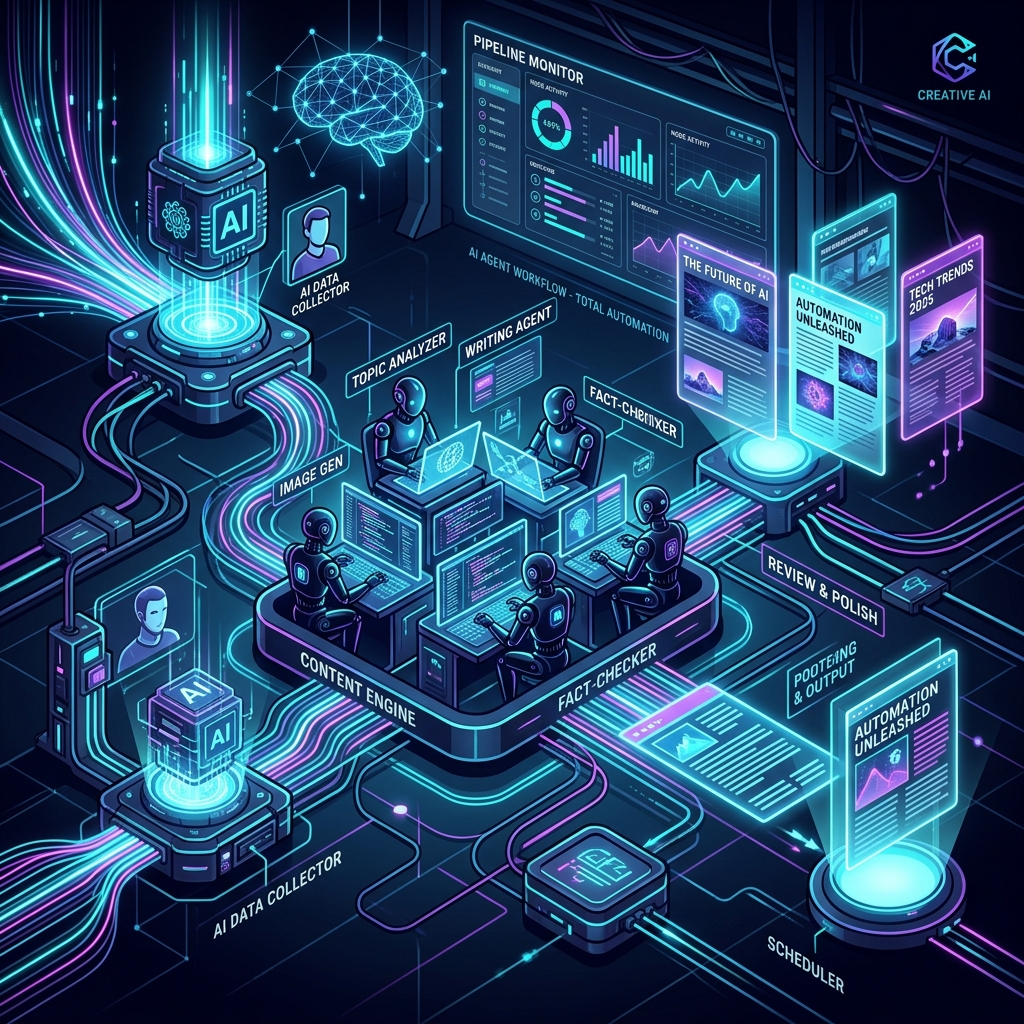
- 2026 Guide: Fully Automated AI Agent Workflows for Blog Monetization
This review is based on hands-on use of Google Stitch during April 2026. Google Labs may change features or pricing without notice; verify the current state at stitch.withgoogle.com.
コメント
[…] Google Stitch Review 2026 […]