GPT-5.5 is now rolling out inside Codex. If you are using Codex as a coding agent, this is not just a “slightly smarter chatbot” update. It changes which tasks are worth delegating.
- The 30-Second Answer
- What Actually Changed in Codex
- The Decision Rule
- The Best Codex GPT-5.5 Use Cases
- When Not to Use GPT-5.5
- Pricing and Cost Reality
- My Recommended Codex GPT-5.5 Workflow
- What This Means for Solo Developers
- Verdict: Should You Use Codex GPT-5.5?
- Tools Mentioned
- Sources
- Related
- Turn this idea into a working AI workflow.
The 30-Second Answer
- Use GPT-5.5 in Codex for messy, multi-file, ambiguous engineering work.
- Keep cheaper or faster models for small edits, simple refactors, and mechanical cleanup.
- The win is not “better answers.” The win is fewer failed agent runs, fewer clarification loops, and more tasks that finish without you babysitting them.
Read this if you already use Codex, Claude Code, Cursor, or another AI coding workflow and want to know where GPT-5.5 actually changes the economics.
OpenAI describes GPT-5.5 as stronger at agentic coding, computer use, research, data analysis, documents, spreadsheets, and multi-tool work. It is rolling out to ChatGPT and Codex first, with API access coming soon. In Codex, GPT-5.5 has a 400K context window, and Fast mode is available at higher cost for faster token generation.
That means the practical question is simple:
When is GPT-5.5 worth using in Codex, and when is it overkill?
What Actually Changed in Codex
The important upgrade is not just raw benchmark movement. It is task endurance.
Earlier coding models were already good at isolated patches. The failure mode was the middle of the task:
- The agent understood the first file but missed the second-order effect.
- It made the patch but skipped the test that mattered.
- It handled the happy path but missed migration, copy, docs, or build scripts.
- It got stuck after one failed command and needed handholding.
GPT-5.5 is aimed at exactly that class of work. OpenAI says it can plan, use tools, check its work, handle ambiguity, and keep going across multi-part tasks. That is the behavior you want from Codex because Codex is not only a model call. It is a working environment: repo, files, shell, browser, tools, and often multiple agents.
In practice, that makes GPT-5.5 most useful for tasks where the cost of failure is not the token bill, but your attention.
The Decision Rule
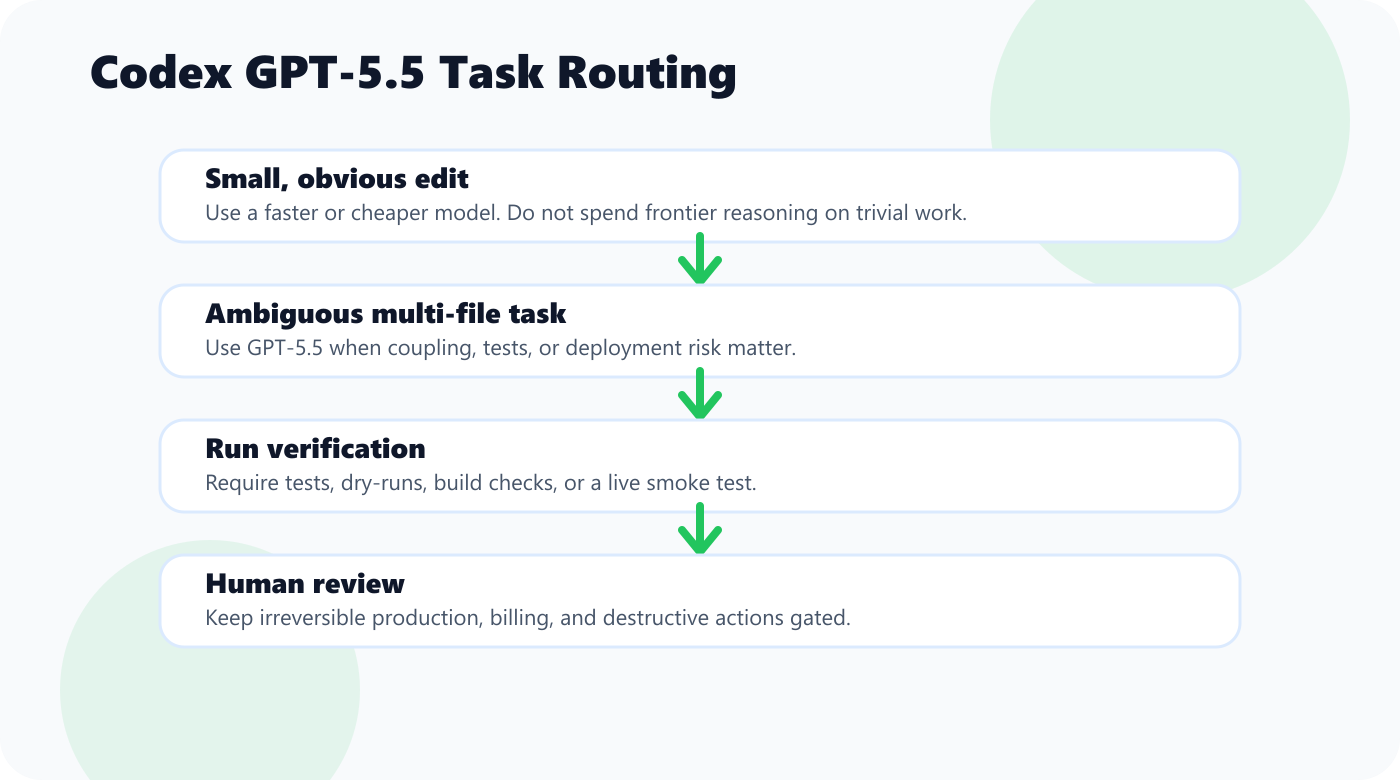
Use GPT-5.5 when the task has at least one of these three traits:
| Trait | Why GPT-5.5 Helps |
|---|---|
| Ambiguity | The agent must infer intent, not just edit text. |
| Coupling | The change touches multiple files, systems, or workflows. |
| Verification risk | A wrong answer may pass visually but fail in production. |
If the task has none of those traits, do not overthink it. Use a cheaper model, a faster mode, or direct editing.
The Best Codex GPT-5.5 Use Cases
1. Multi-file feature implementation
Use GPT-5.5 when a task touches product logic, UI, tests, docs, and config at the same time.
Good prompt:
Implement the new sponsor CTA flow end to end.
Read the existing article templates, preserve current visual style, add tests where the repo already has tests, and run the relevant verification commands.
Do not create a second system for this. Reuse the existing publishing pipeline.
Bad prompt:
Make this better.
GPT-5.5 is strong, but vague delegation still wastes money. Treat it like a senior engineer who needs the target outcome, constraints, and verification path.
2. Large refactors with hidden coupling
Refactors are where weaker agents often create expensive cleanup work. GPT-5.5 is better suited when the agent must preserve behavior while changing structure.
Use it for:
- Moving a feature from one module to another
- Removing duplicate utilities
- Changing API response shapes
- Updating a build or deploy pipeline
- Migrating old content or schema conventions
Do not use it for:
- Rename-only changes
- Formatting
- One-line bug fixes
- Mechanical search-and-replace
Those are better for cheaper models or direct editor work.
3. Debugging failures with unclear cause
Codex gets much more useful when it can run commands, inspect output, and reason from failed tests. GPT-5.5 is a better fit for bugs where the symptom is not the cause.
Good examples:
- A build fails only after deployment
- A UI bug appears only on mobile
- A content pipeline publishes duplicate posts
- A WordPress REST API update succeeds but the rendered page is wrong
The prompt should include the failure, the expected behavior, and permission to inspect the repo:
Find why this publish script creates duplicate WordPress posts instead of updating existing slugs.
Do not rewrite the whole pipeline. Identify the minimal safe fix, apply it, and verify with a dry run before any live API write.
That kind of instruction turns Codex from autocomplete into an operator.
When Not to Use GPT-5.5
GPT-5.5 is more capable, but it is not automatically the right model for every Codex task.
Do not use it by default for:
- Small copy edits
- Formatting-only changes
- Simple dependency bumps
- Trivial CSS adjustments
- Tasks where you already know the exact patch
If the task is obvious and low-risk, speed and cost matter more than frontier reasoning.
The better workflow is tiered:
| Task Type | Best Model Choice |
|---|---|
| One-file edits | Fast/cheaper model |
| Mechanical cleanup | Fast/cheaper model |
| Multi-file feature | GPT-5.5 |
| Ambiguous bug | GPT-5.5 |
| Long-running repo work | GPT-5.5 |
| Production migration | GPT-5.5 plus human review |
This is the same rule I use for AI tools generally: pay for intelligence only where intelligence changes the outcome.
Pricing and Cost Reality
OpenAI says GPT-5.5 will come to the API soon at $5 per 1M input tokens and $30 per 1M output tokens, with a 1M context window. GPT-5.5 Pro is planned at a much higher API price for higher-accuracy work.
Inside Codex, the more important metric is not raw token price. It is task success rate.
If GPT-5.5 completes a difficult task in one run where a cheaper model needs three attempts and a human rescue, GPT-5.5 is cheaper in the only metric that matters: engineering time.
But if you use GPT-5.5 for tiny tasks, you are just buying expensive convenience.
The ROI rule:
Use GPT-5.5 when the task has ambiguity, coupling, or verification risk.
Use cheaper models when the task is obvious, local, and easy to check.
My Recommended Codex GPT-5.5 Workflow
This is the part most people skip. The model upgrade only matters if your delegation style improves with it.
Step 1: Write the task like a ticket
Include:
- Goal
- Files or area to inspect
- Constraints
- What not to change
- Verification command
- Definition of done
Example:
Goal: Add canonical internal links to every published article.
Inspect: articles/*/meta.json, articles/*/post.md, scripts/internal-links.mjs.
Constraint: use meta.json slug, not folder name.
Do not create duplicate WordPress posts.
Verify: dry-run first, then apply only if all slugs resolve.
Done when old internal URLs no longer appear in local articles or live WP content.
Step 2: Ask for a small plan before edits
For complex work, make Codex state the plan first. This catches misunderstandings early.
Step 3: Require verification
Every meaningful task should end with:
- Tests
- Build
- Dry-run
- Diff review
- Live smoke check
If the repo has no tests, ask Codex to create the smallest practical verification script instead of pretending confidence.
Step 4: Keep human review for irreversible actions
Codex can do a lot, but production writes, destructive commands, migrations, and billing-sensitive changes still deserve review.
The best setup is not blind automation. It is controlled delegation.
What This Means for Solo Developers
For solo developers, GPT-5.5 in Codex is most valuable because it compresses the distance between “I should fix this someday” and “the fix is live.”
That matters for the boring work:
- Cleaning duplicate posts
- Updating SEO metadata
- Refactoring scripts
- Adding tests
- Writing docs
- Fixing build warnings
- Checking live pages
These tasks do not feel urgent, so they accumulate. Codex with GPT-5.5 is useful because it can take a vague operational problem and move it toward a finished state while you stay focused on strategy.
That is the real upgrade.
Verdict: Should You Use Codex GPT-5.5?
Use it if:
- You already delegate real repo work to Codex
- Your tasks span multiple files or tools
- You care about fewer failed runs
- You want Codex to operate more independently
- You can define clear verification steps
Wait or use cheaper models if:
- You only need autocomplete
- You mostly do tiny one-file edits
- You cannot review the output
- You do not have a clear task definition
GPT-5.5 makes Codex more useful as an engineering operator. But the model does not replace judgment. The leverage comes from giving it the right class of work.
If you remember one line, make it this:
GPT-5.5 is for tasks where a failed agent run would cost more than the model bill.
Tools Mentioned
Affiliate disclosure: some links below are referral or affiliate links. If you buy through them, this site may earn a commission at no extra cost to you. Recommendations stay based on practical fit, not payout.
Recommended writing workflow tool
If your bottleneck is turning rough notes into publishable drafts, Typeless is worth testing. It fits best when you already have ideas and need cleaner first drafts, faster editing, or repeatable writing workflows.
Sources
- OpenAI: Introducing GPT-5.5
- OpenAI: Codex for almost everything
- OpenAI API docs: GPT-5-Codex model reference
コメント
[…] Codex GPT-5.5 Guide: What Changed, Who Should Use It, and How to Get ROI […]