The most useful AI video workflow right now is not “type a prompt and hope the video looks good.”
It is this:
create a strong still image first with ChatGPT image generation, then animate that image with Seedance 2.0.
People often call this trend “ChatGPT Image 2 + Seedance 2.0.” The naming around ChatGPT image tools can change, and OpenAI’s current API documentation refers to GPT Image models such as gpt-image-1.5, gpt-image-1, and gpt-image-1-mini. But the practical idea is simple: use ChatGPT’s image strength for concept, composition, and visual direction, then use Seedance 2.0 for motion, camera, timing, and short-form video output.
That split matters because image models and video models solve different problems.
Why This Workflow Is Getting Attention
Text-to-video is powerful, but it can drift. Characters change. Product details shift. Composition becomes unstable. The first frame may not match the final frame.
Starting with a still image reduces that risk.
You can use ChatGPT image generation to create:
- a product hero frame
- a consistent character
- a landing page visual
- a cinematic opening shot
- a social media thumbnail
- a before-and-after concept
Then Seedance 2.0 can turn that reference into motion. The seedance2.ai site highlights multimodal inputs, image-to-video, text-to-video, reference-based generation, video extension, editing, and audio support. It also exposes practical controls such as resolution, duration, and aspect ratio.
In plain terms: ChatGPT helps you decide what the video should look like. Seedance 2.0 helps you make it move.
The Practical 4-Step Workflow
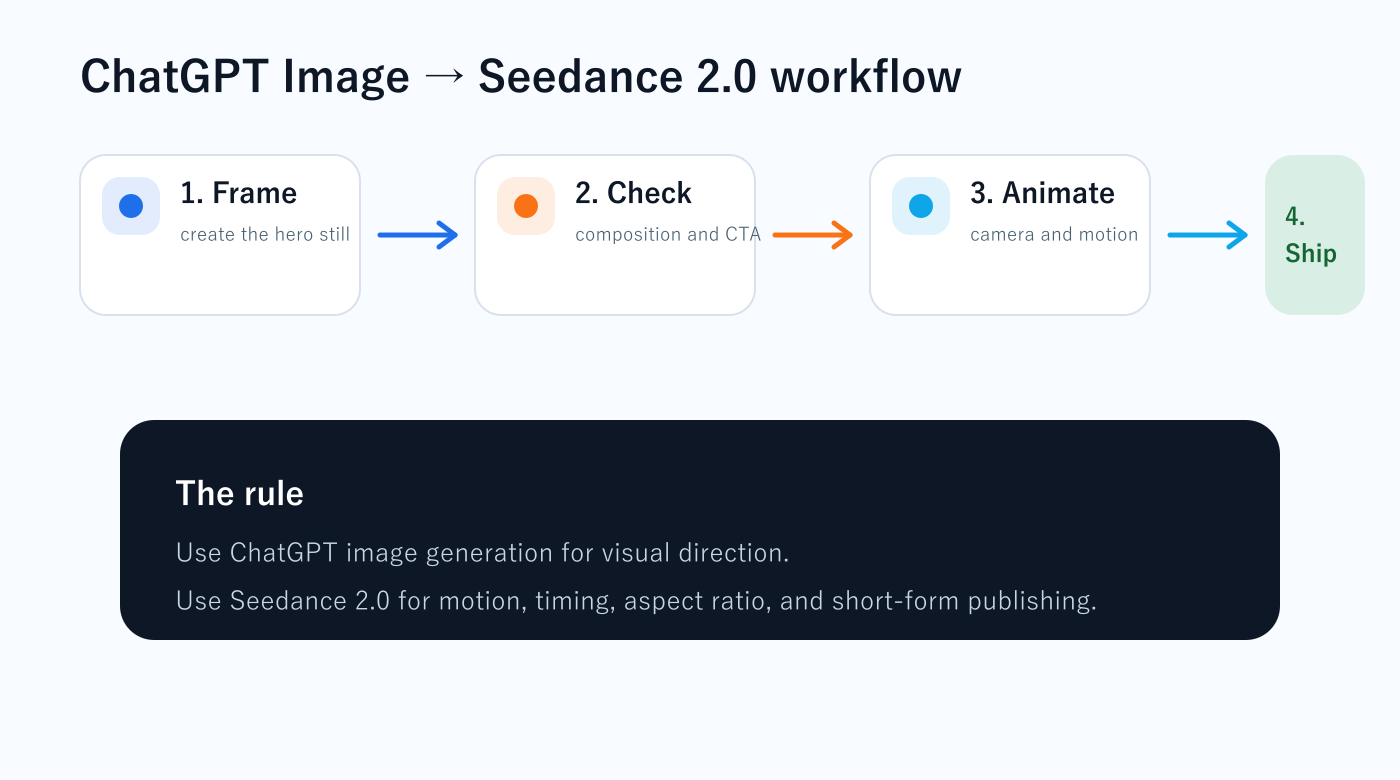
1. Create the still image first
Do not start with motion. Start with the frame that would make someone stop scrolling.
Prompt ChatGPT image generation for one clear scene:
A premium SaaS landing page displayed on a laptop.
The screen shows a clean AI content workflow dashboard.
Minimal white interface, black typography, one blue CTA button.
Soft studio lighting, realistic desk, high-end startup aesthetic.
The goal is not art. The goal is a strong reference frame.
2. Clean up the image
Before sending it to Seedance 2.0, check:
- Is the subject clear?
- Is the CTA readable?
- Are hands, faces, logos, and text acceptable?
- Does the image work as a thumbnail?
- Does it match the offer or article?
If the still image is weak, the video will usually be weak too.
3. Animate with Seedance 2.0
Use the image as the first frame or reference. Then describe the movement:
Use the uploaded image as the first frame.
The camera slowly pushes toward the blue CTA button.
The dashboard elements subtly animate in sequence.
Keep the same laptop, same desk, same color palette, and same typography.
Duration: 5 seconds.
Aspect ratio: 16:9.
Style: premium SaaS product video, clean, calm, conversion-focused.
This is where Seedance 2.0’s reference-based workflow becomes useful. You are not asking it to invent everything. You are giving it a visual anchor.
4. Publish it where motion matters
Use the final clip in places where movement improves action:
| Asset | Best use |
|---|---|
| Blog article | increase attention and dwell time |
| Landing page | show transformation or product value |
| Social post | stop the scroll and send traffic back |
| Newsletter page | preview the value of subscribing |
| Service page | make the offer feel more concrete |
The video should always point somewhere. A video without a next step is just decoration.
Prompt Formula
Use this structure:
Use the uploaded image as the first frame.
Preserve: [subject, character, product, colors, text style].
Motion: [camera movement + object movement].
Emotion: [premium, urgent, calm, playful, cinematic].
Duration: [5-10 seconds].
Aspect ratio: [9:16, 16:9, 1:1].
Final frame: [what the viewer should notice].
For social video, use 9:16. For article embeds and landing pages, use 16:9. For X or Instagram feed tests, use 1:1.
Cost and Quality Tip
Seedance2.ai lists different credit rates by resolution. 480p is cheaper for testing, while 720p and 1080p are better for final assets. The smart workflow is:
- test motion at 480p
- keep only the best concept
- regenerate or upscale the winner
Do not spend high-resolution credits while you are still testing the idea.
Verdict
The ChatGPT Image 2 + Seedance 2.0 workflow is useful because it separates creative direction from motion generation.
ChatGPT gives you the frame.
Seedance 2.0 gives you the movement.
Together, they are strongest for short marketing clips, article visuals, product explainers, service-page motion, and social content that leads back to a website.
If your goal is revenue, do not generate random videos. Build a path:
image → motion → attention → article or landing page → action.
Contest Angle: Use This Workflow for Agent Creation Cup 2026
Sousaku.AI is promoting Agent Creation Cup 2026, and this image-to-video workflow fits the contest well. The official event page says participants should follow the official Sousaku.AI X account, join Discord, submit work through the event website, and share the work on X and Discord with #SousakuAI and #SousakuAgentCreationCup2026.
The practical play is simple: use ChatGPT image generation to create a clean hero frame for your agent, use Seedance 2.0 to animate it into a 5–8 second demo, show the problem, show the agent in action, and end with your agent name and contest tags.
The event page lists early-bird credit rewards, a 20-credit applicant bonus, credit top-up bonuses, and a first-time subscription credit perk. Confirm the current dates and requirements on the official page before entering.
If you want to turn a still image into a contest-ready demo video, start with Sousaku.AI, then check the official X announcement and event page for the latest rules.
Start Sousaku.AI with the referral link / View the official X announcement / Open the official event page
AI images and videos only create value when they lead to a clear next step. I build content and website assets around that path: search, trust, offer, email, and conversion.
コメント