Seedance 2.0 is an AI video generation model designed for multimodal video creation. In plain English, it helps you turn prompts, images, video references, and other inputs into short videos.
But the useful question is not “Can Seedance 2.0 generate a video?”
The useful question is:
Can it help you make videos that people actually watch, understand, and act on?
This guide explains what Seedance 2.0 is, how seedance2.ai presents the workflow, how to think about pricing and credits, and how to write prompts that produce practical videos for social media, landing pages, articles, and service offers.
- What Seedance 2.0 Does
- Who Should Care About Seedance 2.0?
- The Best Way to Use Seedance 2.0
- A Simple Prompt Structure
- Pricing and Credit Logic
- What Makes a Seedance 2.0 Video Useful?
- How to Use Seedance 2.0 on a Revenue Website
- Verdict: Seedance 2.0 Is Best for Short, Directed Video Assets
- Use Seedance 2.0 for the Sousaku.AI Agent Creation Cup
- Sources
What Seedance 2.0 Does
As of April 27, 2026, the seedance2.ai website presents Seedance 2.0 as a multimodal AI video model. The site highlights input types such as text, image, video, and audio, along with reference-based video generation, style consistency, character consistency, video extension, editing, and sound generation.
The practical takeaway:
| Capability | Why it matters |
|---|---|
| Text to video | Create a clip from a written scene |
| Image to video | Animate a visual concept or product image |
| Reference input | Guide motion, camera, style, or character |
| Video extension | Continue an existing clip |
| Sound support | Create more complete short-form assets |
| Multiple resolutions | Test cheaply, then upscale only winners |
Sousaku AI’s Seedance 2.0 model page also shows support for common short-video formats, including 480p and 720p, durations from 4 to 15 seconds, and aspect ratios such as 16:9, 9:16, 1:1, and 21:9.
That makes Seedance 2.0 especially relevant for short marketing clips.
Who Should Care About Seedance 2.0?
Seedance 2.0 is useful for people who need motion but do not want a full video production pipeline.
Good use cases include:
- YouTube Shorts, TikTok, and Reels concepts
- landing page hero clips
- product explanation videos
- article companion visuals
- social posts that drive traffic back to a site
- before-and-after clips for service offers
- pitch visuals for clients
The model is not a replacement for a full creative director, editor, legal review, or brand approval process. It is a way to produce visual motion faster so you can test ideas faster.
That difference matters.
The Best Way to Use Seedance 2.0
The biggest mistake people make with AI video is asking for “a cool video.”
That is not a prompt. That is a wish.
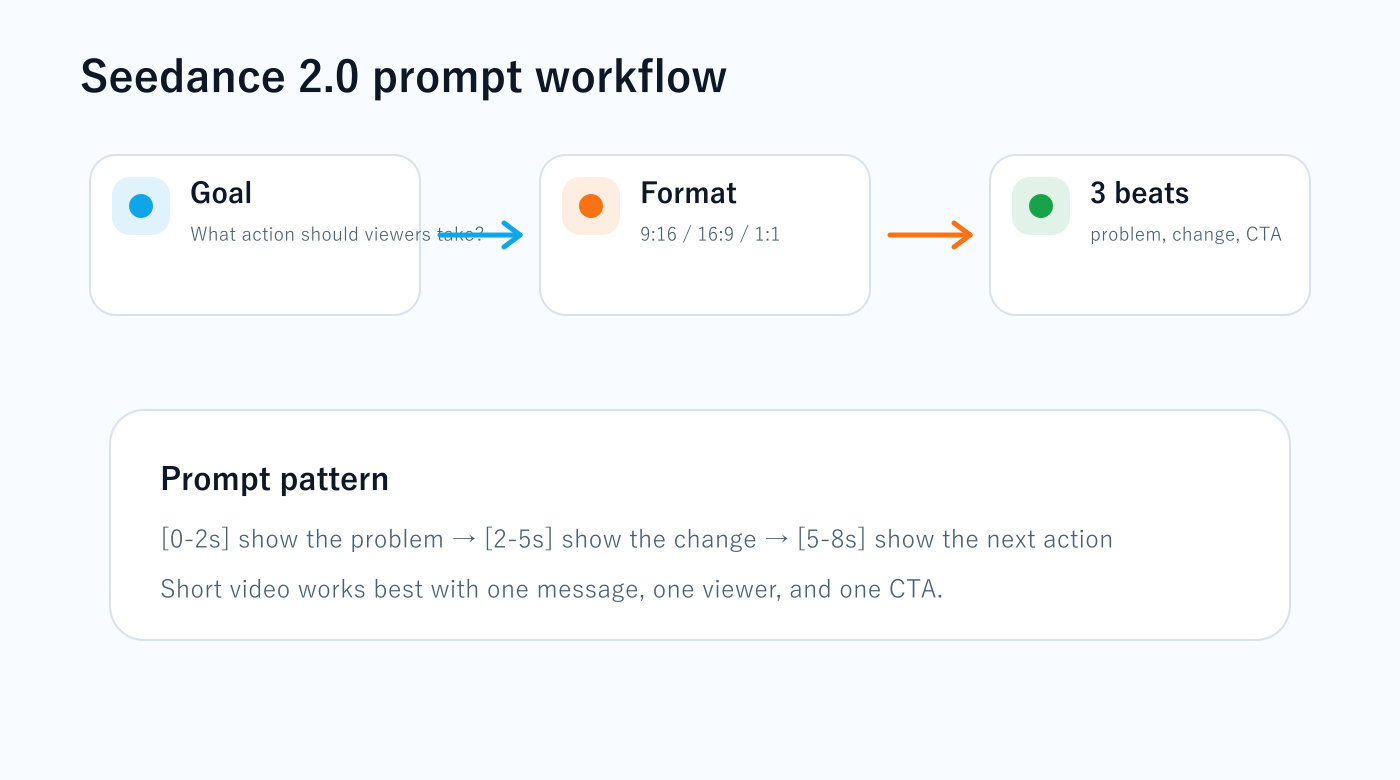
For practical videos, start with this sequence:
- Define the viewer.
- Define the action you want.
- Choose the aspect ratio.
- Break the video into three short beats.
- Specify camera movement and style.
- Add the final call to action.
Short video works best when it has one job.
Not five jobs. One.
A Simple Prompt Structure
Use this structure:
[0-2s] Show the problem.
[2-5s] Show the transformation.
[5-8s] Show the next action.
Style: minimal, premium, clean UI, soft lighting.
Camera: slow push-in.
Format: vertical 9:16.
Text: short and readable.
Goal: drive viewers to read the full article.
This format works because it gives the model time, motion, structure, and intent.
Example: Landing Page Improvement Video
[0-2s] A cluttered website screen with too many buttons and weak hierarchy.
[2-5s] The layout reorganizes into a clean landing page with a clear headline, proof section, and strong CTA.
[5-8s] The camera slowly moves toward the “Book a Consultation” button.
Style: minimal, high-end web agency, white background, black typography, subtle blue accent.
Aspect ratio: 16:9.
Example: AI Tool Article Promo
[0-2s] A creator staring at too many AI tool tabs.
[2-5s] The tabs collapse into three clear choices: image, video, workflow.
[5-8s] The final frame says “Read the practical guide.”
Style: clean, modern, editorial tech design, soft motion.
Aspect ratio: 9:16.
Example: Product Explanation Clip
[0-2s] A customer is confused by a complex product page.
[2-5s] Three simple cards appear: problem, solution, result.
[5-8s] The product interface appears with one clear CTA button.
Style: polished SaaS explainer, calm color palette, smooth transitions.
Aspect ratio: 1:1.
Pricing and Credit Logic
The seedance2.ai pricing page shows Seedance 2.0 credit usage by resolution. For video generation without video input, the listed rates include 480p at 6 credits per second, 720p at 12 credits per second, and 1080p at 30 credits per second.
That means a five-second test clip can cost very different amounts depending on resolution.
The practical workflow:
- Test ideas at 480p.
- Move promising clips to 720p.
- Use 1080p only when you know the concept works.
Do not burn high-resolution credits while you are still testing the idea.
The idea matters first. Resolution comes later.
What Makes a Seedance 2.0 Video Useful?
A useful AI video does at least one of these things:
- stops the scroll
- explains a benefit faster than text
- makes a product feel easier to understand
- shows a before-and-after transformation
- guides attention toward a CTA
- increases perceived value of an article or offer
A useless AI video is just visual noise.
That is the difference between “AI video generation” and “AI video marketing.”
How to Use Seedance 2.0 on a Revenue Website
If you are building a website that needs traffic, trust, and conversion, use Seedance 2.0 in these places:
| Website asset | Video job |
|---|---|
| Blog article | summarize the core idea visually |
| Service page | show the transformation you deliver |
| Newsletter page | preview the value of subscribing |
| Paid article | show the template, workflow, or outcome |
| Social channel | send viewers back to the site |
This is where Seedance 2.0 becomes strategically useful. The video is not the business. The video is a bridge to the business.
Verdict: Seedance 2.0 Is Best for Short, Directed Video Assets
Seedance 2.0 is not something I would use by starting with a vague creative prompt and hoping for magic.
I would use it with a clear commercial job:
- make a reader stop
- make a product easier to understand
- make a landing page feel more alive
- make an article more memorable
- make a service offer feel more concrete
If you use it that way, Seedance 2.0 becomes more than an AI video generator. It becomes a way to create motion assets for content, conversion, and trust.
Use Seedance 2.0 for the Sousaku.AI Agent Creation Cup
Sousaku.AI’s Agent Creation Cup 2026 is a good reason to create short, practical demo videos. The official event page says participants should follow the Sousaku.AI X account, join Discord, submit work through the event website, and share the work on X and Discord with #SousakuAI and #SousakuAgentCreationCup2026.
Seedance 2.0 can help you show the problem your agent solves, the user input, the agent output, and the final result in a short 5–8 second clip.
The official page lists early-bird credit rewards, a 20-credit applicant bonus, a 10% credit top-up bonus, and a first-time subscription perk. Check the event page before entering because timing and conditions may change.
Use Sousaku.AI to build the agent concept, generate supporting visuals, and create a short Seedance 2.0 demo that explains the value in seconds.
Start Sousaku.AI with the referral link / View the official X announcement / Open the official event page
AI video is strongest when it leads somewhere: an article, an offer, a newsletter, or a paid resource. If you want your website structured around that path, start with the order page.
Request a website/content improvement / See paid article paths
コメント