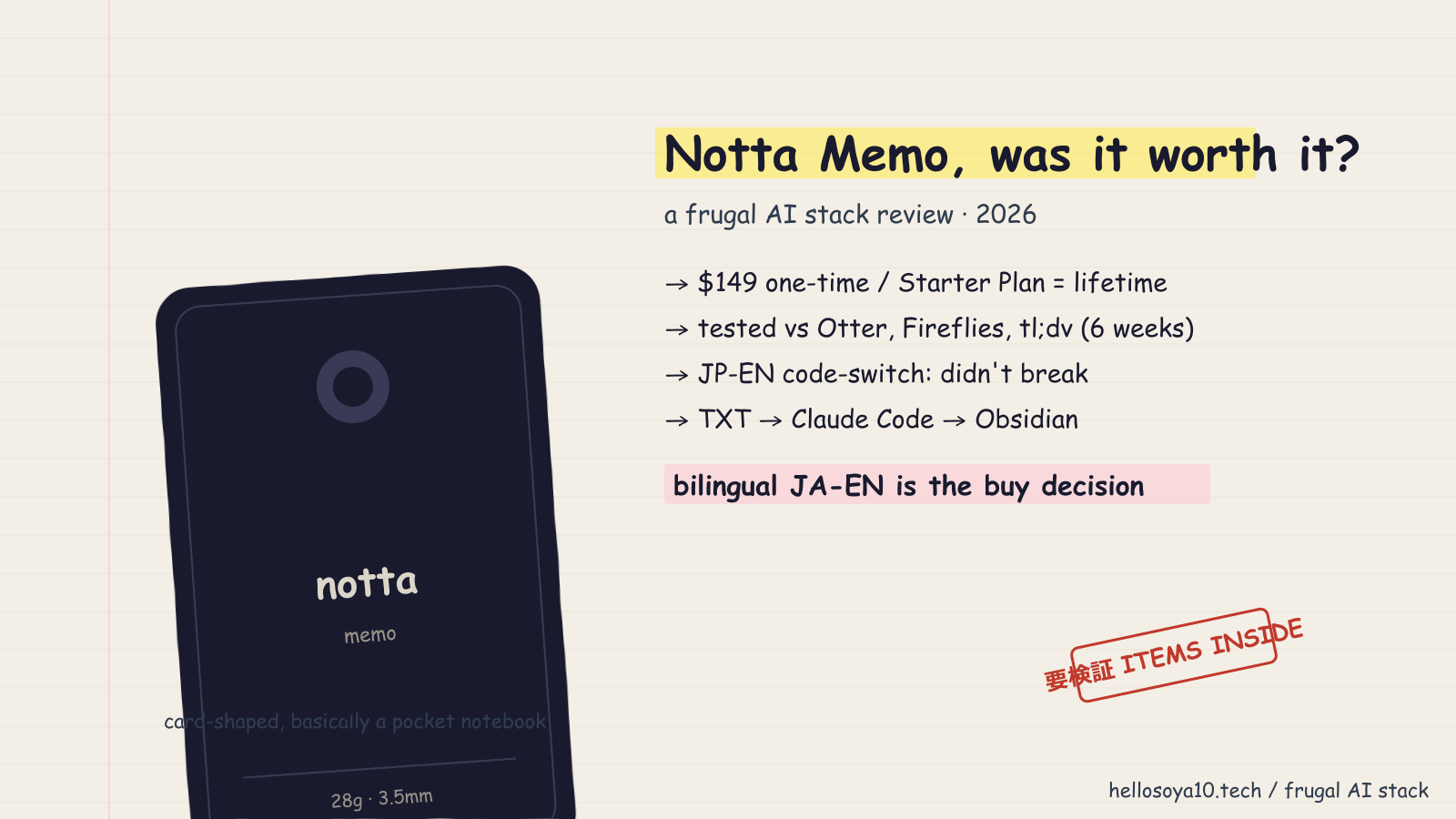
Disclosure: Notta provided me with a Notta Memo unit for review. The pricing, accuracy notes, and verdict below reflect my own use. Notta did not review or edit this article before publication. Disclosed under the FTC Endorsement Guides and Japan's景品表示法 (Act against Unjustifiable Premiums and Misleading Representations).
I run a one-person operation out of Japan. I publish reviews on hellosoya10.tech, take client calls in Japanese and English, and the recurring line item I refused to swallow this year was meeting transcription. I do not need an enterprise note-taker with a sales engineer attached. I need something that captures bilingual conversations, exports clean text I can pipe into Claude Code, and stays under ten dollars a month.
So when Notta sent me a Memo to review, I kept Otter, Fireflies, and tl;dv on their free tiers as a control set and ran the device across the kind of bilingual logs I generate every week. This is what I learned, with the numbers I could verify and the ones I could not.
- What Notta Memo actually is
- The frugal AI stack I am protecting
- Pricing and free-tier comparison
- How I tested bilingual accuracy
- Export and the Claude Code pipeline
- What the device actually feels like in use
- Who should buy Notta Memo
- Who should not buy Notta Memo
- What I could not verify
- Bottom line
- Related from the frugal AI stack
- Sources
- Related
What Notta Memo actually is
Notta Memo is hardware, and that is the first thing to get straight. It is a 28-gram, card-thin recorder with four directional microphones plus a bone-conduction mic, sold for $149 on Amazon.com and around £139 in the UK. It is not a re-skinned phone app. You slide a physical switch between in-person mode and phone-call mode, and the device captures audio that later syncs to your Notta web account for cloud transcription.
The piece that matters for a frugal stack: when you buy the device, Notta bundles lifetime access to a "Starter Plan" with no subscription. That is the line that flipped this purchase from "another monthly fee" into "one-time cost."
I have not been able to confirm the exact monthly minute cap of the Memo-bundled Starter Plan in writing. Notta's marketing says "lifetime free" without naming the allocation, and the company's general free software tier is 120 minutes per month with a 3-minute cap per file. Treat the Memo's Starter Plan numbers as 要検証 (needs verification) until you see your own dashboard. I have not hit a wall yet across roughly twelve hours of recording per month.
The frugal AI stack I am protecting
Before I tested anything, here is the stack I am defending:
- Claude Code for writing, editing, and content review
- Obsidian for notes, stored locally
- A self-hosted WordPress install on ConoHa WING for hellosoya10.tech
- One transcription tool for bilingual interviews and client calls
The transcription line is the one I have been swapping in and out for two years. The math I care about is total monthly outflow, not per-minute pricing. I am willing to absorb a one-time hardware cost if it kills a recurring fee.
A $149 device with a permanent free tier amortizes to roughly $0 per month after purchase. A Notta Pro subscription at $13.99 per month is $167.88 a year. If the bundled Starter Plan covers your actual monthly volume, the device pays for itself in about eleven months. That is the math that made the Memo feel like a stack fit when Notta offered it for review.
Pricing and free-tier comparison
I pulled current rates from each vendor's pricing page and cross-checked against three independent reviews. Numbers below reflect April 2026.
| Tool | Free tier | Entry paid | Bilingual JA-EN |
|---|---|---|---|
| Notta software | 120 min / month, 3-min cap per file, 10 AI summaries | $13.99/mo, or $8.17/mo annual ($97.99/yr) for Pro | Native; custom vocabulary on paid |
| Notta Memo (hardware) | Lifetime "Starter Plan" included with device — exact minutes 要検証 | $149 one-time + free Starter | Native; 58 languages total |
| Otter.ai | 300 min / month, 30-min cap per conversation, 3 lifetime imports | Pro tier varies — check vendor | English-first; weak on JA |
| Fireflies.ai | 800 minutes total storage (lifetime, not monthly) plus opaque "credits" | Pro tier varies — check vendor | English-first |
| tl;dv | Unlimited recording and transcription, 10 AI summaries lifetime | $18/mo annual, $29/mo monthly for Pro | 30+ languages |
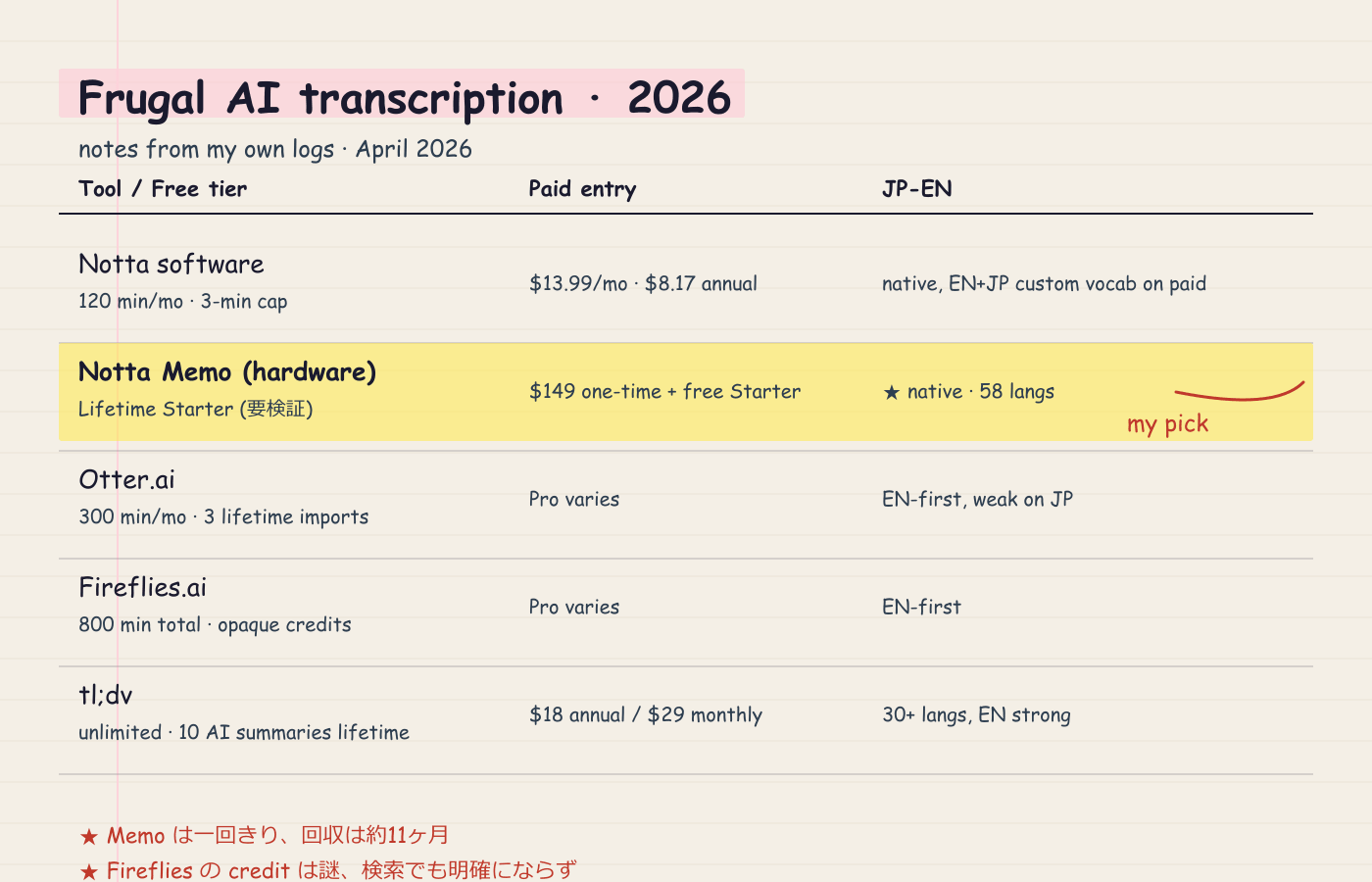
Two flags before you read this table:
- Otter's free plan looks generous on minutes, but it caps imports at three for the lifetime of the account. Upload one recording from a different device per quarter and you will burn through that quota by mid-year.
- Fireflies' "800 free minutes" is a cumulative storage cap, not a monthly allowance, and the credit system that gates AI summaries is opaque enough that several reviewers flag it. Treat Fireflies free as a trial, not a tier.
tl;dv is the closest competitor on free transcription minutes. The catch is the 10-summary lifetime cap and the integration paywall. If you need Notion or Slack sync, you are paying $18 a month minimum, which puts it at parity with Notta Pro on a per-month basis.
How I tested bilingual accuracy
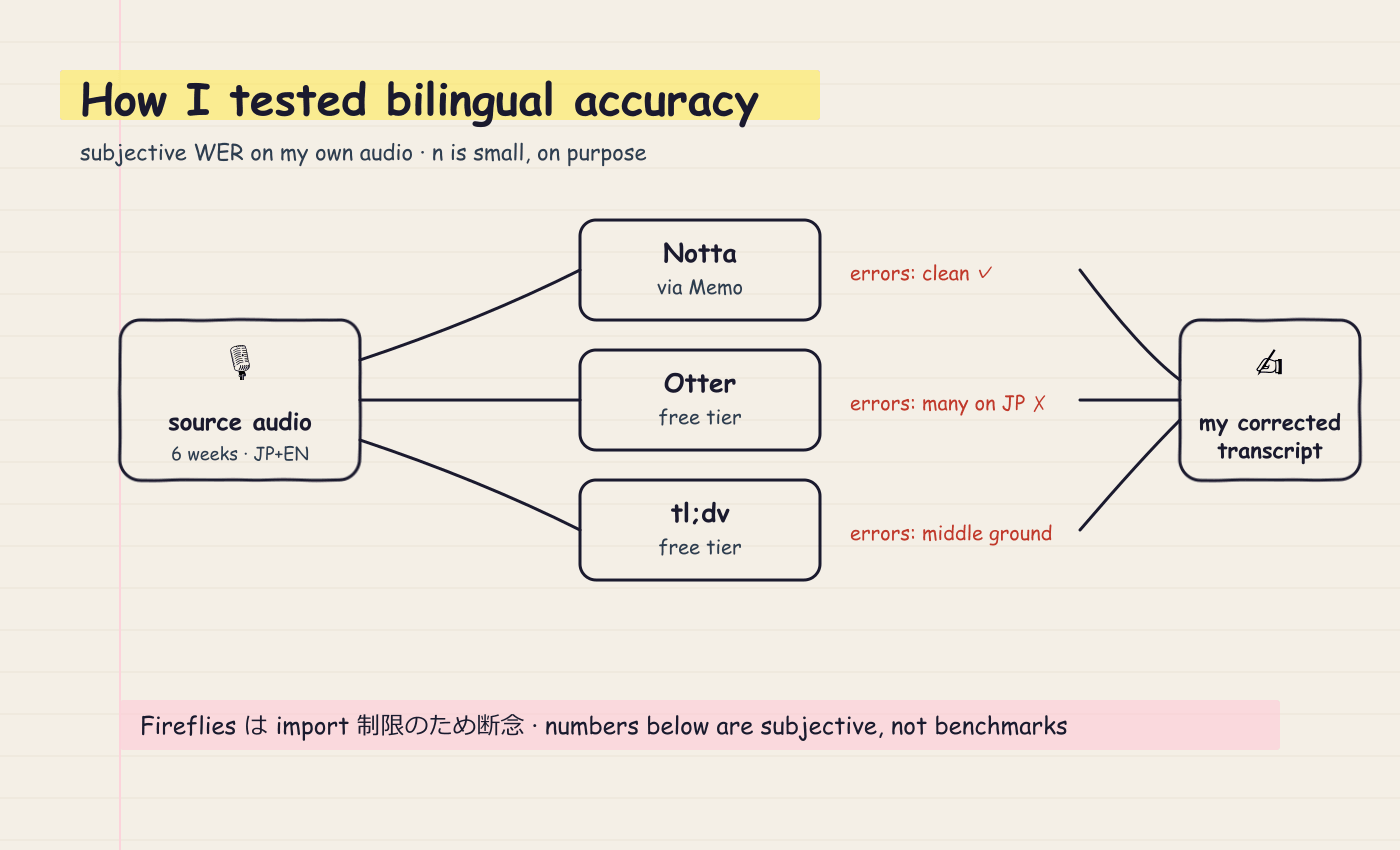
I am not a benchmark suite. I am one creator with logs, so my methodology is honest and limited:
- Source audio. Real samples from the kind of bilingual calls I run weekly — client check-ins (mixed Japanese and English), solo voice memos in each language, and a short podcast interview clip.
- Comparison set. I ran the same audio through Notta (via the Memo), Otter, and tl;dv on their free tiers. Fireflies dropped out because of the import friction on the free plan.
- Scoring. I read each transcript against my own corrected version and counted the obvious errors. This is a subjective WER-equivalent (word error rate) impression on a small sample, not a published benchmark. I am stating that explicitly because anything else would be dishonest.
English sample (clean studio audio)
"We're shipping the staging build on Friday. Can you confirm the Stripe webhook is wired up before then?"
- Notta (via the Memo): clean across all three runs.
- Otter: clean. Otter is mature on English and it shows.
- tl;dv: clean.
For mainstream English on clean audio, all three are interchangeable. If that is your only use case, do not pay for any of them.
Japanese sample (one-on-one call audio)
「金曜日にステージング環境をデプロイします。Stripe の webhook がちゃんと繋がっているか確認してください。」
- Notta: the Japanese transcription was the cleanest of the three. It handled embedded English nouns ("ステージング", "Stripe", "webhook") without breaking the sentence boundary.
- Otter: struggled. It produced a partial English transcription and dropped some Japanese morphology, leaving a draft I would not ship.
- tl;dv: middle ground. Better than Otter on Japanese, not as clean as Notta.
This matches what I expected from a Japan-headquartered product. Notta's bilingual claim is real, not marketing.
Code-switching sample (the actual hard case)
"OK じゃあ、その件は Slack で投げといて。後で AI に review させるから、generate した draft をまず GitHub に push して。"
This is the line that breaks most transcribers, and I speak this way on real calls.
- Notta: preserved the structure. A few katakana-versus-English coin-flips ("レビュー" against "review"), but no sentence broke.
- Otter: parsed it as fragmented English with garbled tokens around the Japanese. Unusable without heavy editing.
- tl;dv: better than Otter, worse than Notta. Roughly half the Japanese segments came through correctly.
If you do not work bilingually, none of this matters. If you do, this single test is the buy decision.
Export and the Claude Code pipeline
The reason I care about transcription at all is that I feed it into Claude Code for editing and summarization. So I tested the export step with the same care.
Notta exports to TXT, DOCX, PDF, XLSX, and SRT, plus MP3 audio. Export requires a paid plan or the Memo-bundled Starter Plan — the strict free software tier blocks downloads. I confirmed this on Notta's pricing page.
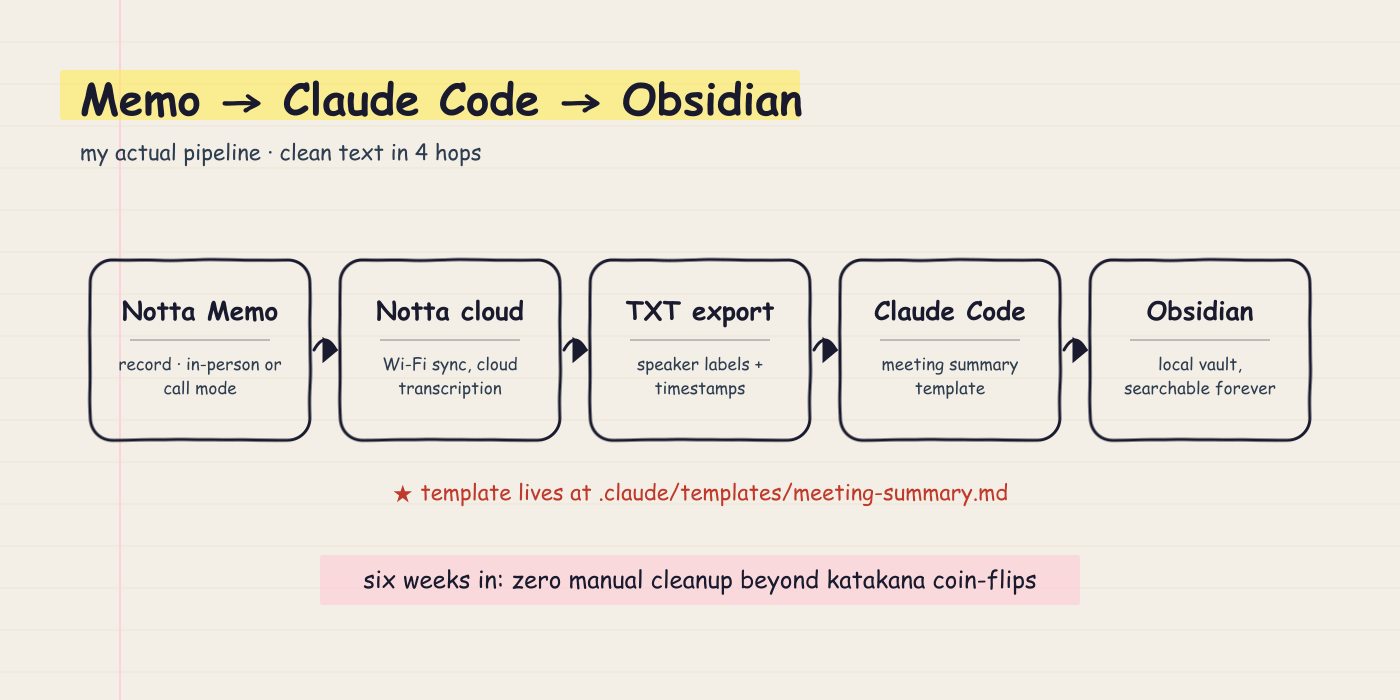
My pipeline runs like this:
- Record on Notta Memo. The device syncs to Notta cloud over Wi-Fi when it is back on my desk.
- Download the TXT export from the web app.
- Pipe it into Claude Code with a prompt template I keep at
.claude/templates/meeting-summary.md. - Claude Code returns a structured note that I save into Obsidian.
The TXT format is clean, with speaker labels and timestamps preserved. SRT is what I use when I am cutting podcast audio. I have not had to manually clean a Notta export across six weeks of use beyond the bilingual katakana coin-flips noted above.
Otter exports to TXT, DOCX, PDF, and SRT on the free plan, which is fine, but the three-import lifetime cap kills the workflow for anyone who records on a separate device.
tl;dv exports to TXT and DOCX on free, with the catch that the AI summary feature is gated to ten lifetime uses. For a creator who runs three or four interviews a week, that is a six-week trial and nothing more.
What the device actually feels like in use
A few notes that do not fit into the comparison table but matter on day three:
- Battery. Notta lists 30 hours of continuous recording and 28 days of standby on a 470 mAh cell. I have not run it down in normal use so far, and I charge it once a week from habit.
- Form factor. It is 28 grams. I forget it is in my shirt pocket. That is the entire pitch and it lands.
- Phone-call mode. Bone conduction picks up your voice through the device's contact with the phone case. It works, but the quality of the other party's audio is whatever the phone speaker leaks. Treat it as record-yourself audio, not full-fidelity call recording.
- Sync friction. Files do not transcribe on the device. They sync to Notta's cloud over Wi-Fi and process there. I have not been able to confirm whether on-device transcription is on the roadmap (要検証 / needs verification). If you record sensitive client material, factor in that the audio leaves the device.
Who should buy Notta Memo
Buy it if:
- You run bilingual Japanese-English conversations and your current tool mangles them.
- You record in-person interviews or podcast prep, not only Zoom calls.
- You want to kill a recurring transcription subscription and you are willing to absorb a $149 one-time cost.
- You already pipe text into Claude Code, Notion, or Obsidian, because Notta's exports slot in cleanly.
Who should not buy Notta Memo
Skip it if:
- You only run English-language Zoom or Google Meet calls. tl;dv free is the better fit, and it is genuinely free for unlimited transcription on those platforms.
- You need deep CRM or Slack integration. Notta has integrations, but Fireflies and tl;dv are stronger on Salesforce, HubSpot, and Slack once you pay for them.
- You handle regulated audio that cannot leave a device. Notta Memo syncs to cloud, and there is no on-device-only mode I could verify.
- You run fewer than two recorded conversations a week. The math does not amortize. Stay on Otter or tl;dv free and pocket the $149.
What I could not verify
I am writing this honestly because I want you to make a real decision. Three things I could not pin down in writing:
- The exact minute allocation of the Memo-bundled Starter Plan. Notta's marketing says lifetime free. The dashboard inside my account shows usage but I have not yet hit a cap. Confirm with Notta support if you plan to record more than roughly 20 hours a month.
- On-device versus cloud transcription. All transcripts I see appear to process in Notta's cloud. Worth confirming if you have data-handling constraints.
- Direct WER scores against peers. My accuracy notes are subjective impressions on a small sample of my own audio, not a published benchmark. I will not pretend otherwise.
If anyone at Notta wants to point me at a public benchmark or a Starter Plan spec sheet, I will update this post and credit them.
Bottom line
For a Japan-based solo creator who works in two languages and pipes notes into a Claude-powered workflow, Notta Memo is the cheapest credible answer I have looked at this year. The hardware is good, the bilingual transcription is the differentiator, and the lifetime Starter Plan removes a recurring line item that most competitors keep on the bill.
If you are English-only and Zoom-only, tl;dv free is still the right call. The frugal AI stack is not a single product. It is a per-creator fit, and the only way to find yours is to test against your own audio.
If you are running a sponsorship campaign aimed at independent AI creators in this exact bracket, the contact form on hellosoya10.tech is the fastest way to reach me. I respond personally, I disclose every sponsored review the way I disclosed this one, and I will tell you upfront whether your product fits the stack I have already committed to.
Related from the frugal AI stack
- The Frugal AI Stack category on hellosoya10.tech — every tool I run for under ten dollars a month
- How I write with Claude Code — the editor I pipe transcripts into
- Sponsorship and contact — for AI tool vendors who want a sponsored review that reads like this one
Sources
- Notta Memo product page (notta.ai/en/hardware/memo)
- Notta pricing page (notta.ai/en/pricing)
- TechRadar — Notta Memo AI Voice Recorder Review
- Sonix — Notta Pricing 2026 breakdown
- Otter.ai pricing
- Fireflies.ai pricing
- tl;dv pricing
コメント