
Claude Code vs Cursor in 2026: I Used Both Daily for 6 Months. Here’s What Actually Ships Faster.
By S | AI Director & Freelance Creator, rural Japan
Hello, this is S.
I have been using Claude Code and Cursor side by side since September 2025. Not as a reviewer comparing features for a blog post, but as a solo developer shipping real projects — a CBT therapy app, browser extensions, content automation tools, and a portfolio site — from a small room in rural Japan with no team.
After six months of daily use, I can tell you: the “which one is better” question is wrong. These tools are playing different games. The useful question is which game matches the work in front of you right now.
This article is the comparison I wish I had read before spending $40/month on both.
The Fundamental Split
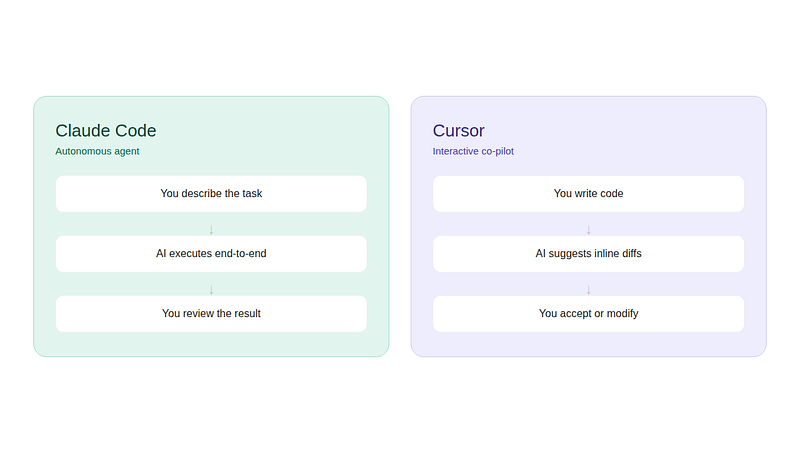
Claude Code is a terminal-native autonomous agent. You describe what you want, it reads your entire codebase, writes a plan, edits files across the project, runs tests, and reports results. You review afterward. It works like delegating to a capable junior developer who reads fast and never gets bored.
Cursor is an AI-native code editor built on VS Code. AI lives inside the editor alongside you — autocompleting as you type, generating inline diffs, and responding to instructions in a sidebar chat. You stay in control of every keystroke. It works like pair programming with someone who can see your screen.
The old framing was “terminal vs IDE.” That framing is dead. Both tools now have agent modes, CLI access, and background capabilities that overlap significantly. Claude Code has a VS Code extension and a desktop app. Cursor shipped its own CLI with agent modes in January 2026.
The real difference in 2026 is about autonomy. How much of the task do you want to hand off?
The Same App, Two Workflows
To make this concrete, here is what happened when I built the same feature — a user authentication system with email verification — using each tool.
With Claude Code:
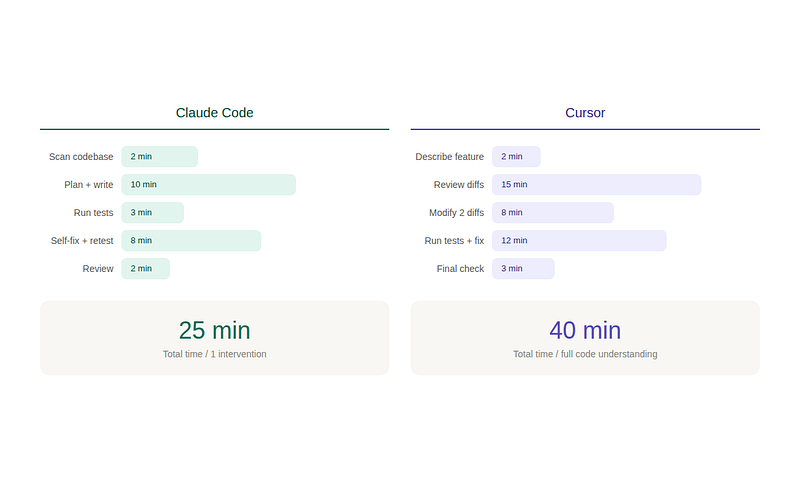
I opened the terminal, described the feature in plain language, and let Claude Code run. It scanned the existing project structure, identified the relevant files (8 of them), generated a migration script, wrote the auth routes, created the email template, added tests, and ran them. Three tests failed on the first pass. It read the error output, diagnosed the issue (a missing environment variable in the test config), fixed it, and re-ran. All tests passed. Total wall-clock time from prompt to working feature: about 25 minutes. I intervened once, to confirm a database schema choice.
With Cursor:
I opened the project in Cursor, described the same feature in the Composer panel, and reviewed the generated diffs file by file. Each diff appeared inline with green/red highlighting. I accepted most, modified two (the password hashing approach and the token expiry logic), and manually triggered the test suite. Two tests failed. I highlighted the error in Cursor’s chat panel, got a fix suggestion, applied it, and re-ran. Total time: about 40 minutes. But I understood every line of the generated code because I reviewed each change before it landed.
The 15-minute difference is real. But so is the difference in my confidence about the code that shipped.
Where Claude Code Wins Clearly
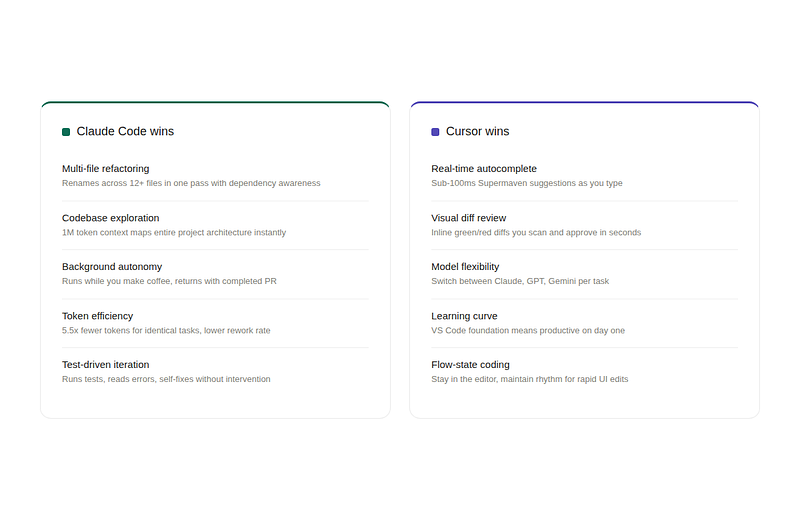
Large-scale refactoring. When I needed to rename a component used across 12 files and update every import, test, and type reference, Claude Code handled it in a single pass. It understood the dependency graph. Cursor would have required me to manage the rename across multiple Composer sessions, tracking which files I had already edited.
Codebase exploration. When I inherited a project I had never seen before — an open-source tool with 200+ files — Claude Code mapped the architecture in seconds. I asked “how does the authentication flow work?” and got a precise, file-referenced answer. This is where the context window advantage matters most. Claude Code holds up to 1 million tokens in context on Opus 4.6. Cursor relies on retrieval-based indexing over a smaller effective window.
Autonomous background tasks. Claude Code can run in the background while I do something else. I have started a refactoring task, gone to make coffee, and come back to a completed PR. That workflow does not exist in Cursor, which requires my attention for each diff approval.
Token efficiency. Independent testing found Claude Code uses roughly 5.5 times fewer tokens than Cursor for identical tasks. On the same benchmark task, Claude Code completed it with 33,000 tokens and no errors. This matters for cost, especially if you are on API billing.
Where Cursor Wins Clearly
Real-time autocomplete. Cursor’s Supermaven integration delivers sub-100ms autocomplete suggestions. When I am in flow state — making rapid, small edits across a UI component — those inline suggestions save more time than any autonomous agent can. Claude Code has no inline autocomplete at all. You write in the terminal, and there is no “Tab to accept” experience.
Visual diff review. Cursor shows AI-generated changes as inline diffs with syntax highlighting. I can scan a proposed edit in seconds and decide whether to accept it. Claude Code applies changes directly to files, and while you can review them afterward, the review step is less integrated into the editing flow.
Model flexibility. Cursor is model-agnostic. I can switch between Claude, GPT, and Gemini depending on the task. Claude Code runs on Anthropic’s models by default. You can integrate other models through MCP, but it is not as seamless as Cursor’s built-in model switcher.
Learning curve. Cursor inherits everything from VS Code. My extensions, keybindings, and settings all carry over. I was productive on day one. Claude Code took about a week before the terminal-first workflow felt natural. For non-developers or those who have never used a terminal extensively, that barrier is not trivial.
The Pricing Reality
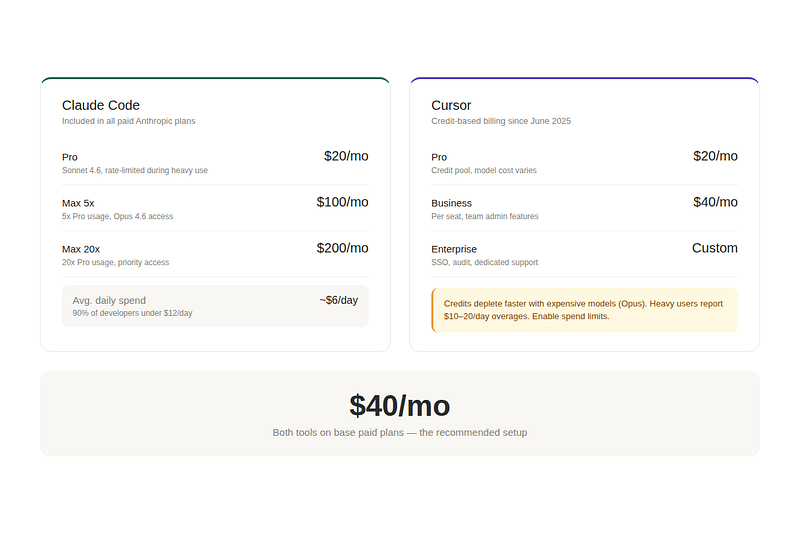
This is where most comparison articles get lazy, listing sticker prices without explaining what you actually pay.
Claude Code is included in every paid Anthropic plan. Pro at $20/month gives you Claude Code with Sonnet 4.6 and rate-limited access. You will hit usage limits during intensive all-day coding sessions. Max at $100/month (5x Pro usage) or $200/month (20x) removes most friction. Anthropic’s own data from March 2026 shows the average developer spends about $6/day on Claude Code, with 90% of users under $12/day.
Cursor Pro costs $20/month. The credit system replaced request-based billing in June 2025. Credits deplete based on which model you use — GPT-5.3 is cheap per credit, Claude Opus is expensive. Heavy users have reported $10–20 daily overages. One team’s $7,000 annual subscription depleted in a single day. If you are on Cursor, enable spend limits immediately.
The combined cost is $40/month if you use both on their base paid plans. For a solo developer, that is the price of about two decent lunches per week. Given how much these tools accelerate shipping, the ROI argument is trivially easy to make.
My recommendation: start with Claude Code Pro at $20/month. If you miss inline autocomplete after a week, add Cursor Pro. You will know within days whether you need both.
The “Use Both” Workflow That Actually Works
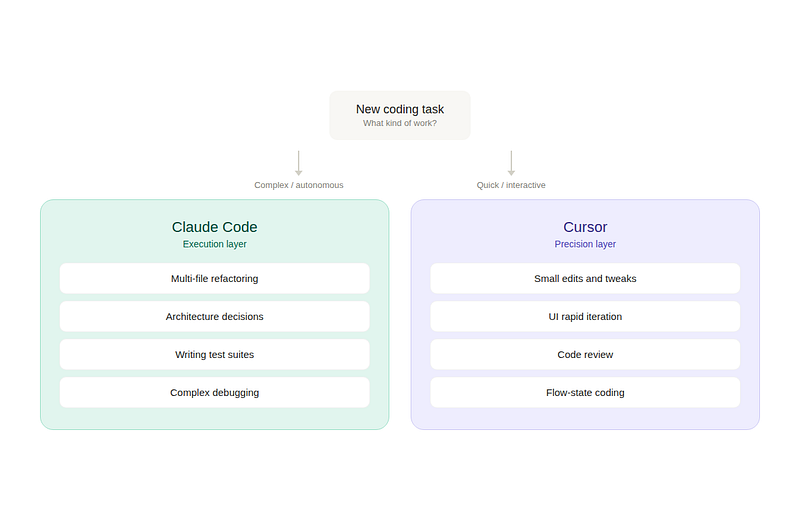
After six months, I have settled into a pattern that many developers are converging on independently.
Claude Code for the heavy lifting. Architecture decisions, multi-file refactoring, writing test suites, debugging complex issues, exploring unfamiliar codebases, and any task where I want to say “do this” and walk away. This is the execution layer.
Cursor for the daily grind. Small edits, UI tweaks, rapid iteration, code review, and any task where I want to stay in the editor and maintain flow state. This is the precision layer.
The two tools do not conflict. Claude Code modifies files in your project directory. Cursor watches that same directory. When Claude Code finishes a refactoring job, Cursor immediately sees the changes and adjusts its context. They complement each other naturally.
The Honest Assessment
Claude Code is the more capable tool for complex, multi-step coding work. The codebase reasoning, the autonomous execution, the token efficiency — these advantages are structural, not just incremental improvements. The developer satisfaction data supports this: Claude Code earned a 46% “most loved” rating compared to Cursor’s 19% in the 2026 Pragmatic Engineer survey.
But Cursor is the more comfortable tool for daily use. The VS Code foundation, the visual diffs, the model flexibility, the autocomplete speed — these make it the tool I open first every morning, even though Claude Code is the tool I rely on for the hardest problems.
The developers who ship fastest in 2026 are not debating which tool is better. They are using both, routing each task to the tool that handles it more effectively, and spending their energy on the product instead of the tooling argument.
Who Should Choose What
If you are a solo developer building side projects and want maximum autonomy: start with Claude Code. The terminal workflow takes a week to learn, and then it becomes a superpower.
If you are already deep in the VS Code ecosystem and want AI without changing your habits: start with Cursor. The transition is frictionless and the productivity gains are immediate.
If you are shipping production software and every hour of development time has a dollar value attached to it: use both. At $40/month combined, the cost is negligible relative to the time savings. One successful refactoring session with Claude Code pays for three months of both subscriptions.
Stop choosing. Start shipping.
I write weekly about AI tools, content strategy, and what actually works for solo developers building from rural Japan. Follow for honest reviews — no affiliate links in this article.
Tags: Claude Code Cursor AI Coding Tools Software Development Developer Productivity Vibe Coding 2026

コメント