
I Used Claude Code, Cursor, and Codex for 30 Days as a Solo Dev. Here’s What Actually Matters.
By S | AI Director & Freelance Creator based in rural Japan
Hello, this is S.
I build web apps alone, in a small town in Japan, with no engineering team and no budget for mistakes. Every tool I adopt has to earn its place. So when Claude Code rocketed to the #1 AI coding tool in early 2026 — overtaking GitHub Copilot and Cursor in under eight months — I didn’t just read about it. I used all three side by side, on real projects, for a month.
This is not a benchmark. It’s a field report.
Why This Comparison Matters Now
The 2026 Pragmatic Engineer survey of nearly 1,000 engineers found that 95% now use AI tools at least weekly, and 75% use AI for half or more of their work. The question is no longer whether to use AI for coding. It’s which combination and for what.
Claude Code, Cursor, and OpenAI Codex represent three distinct philosophies. Understanding that distinction is worth more than any feature checklist.
The Three Tools in Plain Terms
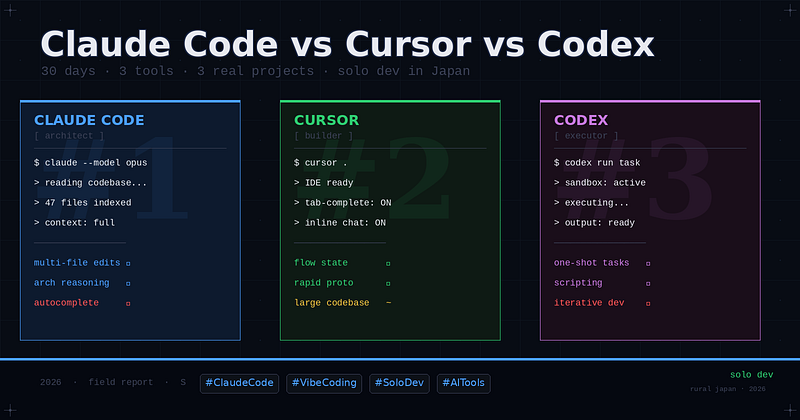
Claude Code is a CLI-first tool. You work in your terminal and your own editor. Claude handles reasoning, code generation, and file edits — but you stay in control of the environment. It feels close to pair programming with a senior engineer who never needs sleep.
Cursor is a full IDE fork of VS Code. The AI is woven into the editor itself — autocomplete, inline chat, codebase-aware generation. If you already live in VS Code, the transition cost is near zero.
Codex (OpenAI, released mid-2025) is a cloud-based agent. You describe a task; it spins up an isolated environment, writes and runs code, and returns results. It’s the most “hands-off” of the three.
What I Actually Built With Each
Over 30 days I used all three on three projects:
- 観 (KAN) — a Buddhist-inspired 30-day practice web app (deployed on GitHub Pages)
- Life RPG Dashboard — a gamified productivity tracker with Big Five personality scoring
- A series of sponsored AI tool review articles requiring web scraping and content automation scripts
I did not use each tool in isolation. Real work doesn’t work that way. But I tracked which tool I reached for at each stage of development, and why.
Honest Results
Claude Code: Best for complex, multi-file reasoning
When I was building the Life RPG Dashboard — which involved interconnected state logic, XP calculations, and a Big Five personality model — Claude Code consistently outperformed the others. The key difference: it reads the whole codebase before responding. It doesn’t hallucinate a function that doesn’t exist; it finds the one that does.
The CLI workflow felt like a constraint at first. After a week, it felt like precision. I stopped drowning in IDE noise.
Best for: Architects-style thinking, refactoring, multi-file edits, debugging logic errors.
Limitation: No visual autocomplete. If you want suggestions as you type, this isn’t it.
Cursor: Best for speed and flow state
For the KAN app — which was smaller, UI-heavy, and needed rapid iteration — Cursor was faster. Tab-complete is genuinely good. The inline chat understands file context without me having to manage it. I shipped the MVP in half the time I expected.
The downside showed when the project grew: Cursor’s context window management became inconsistent. It would “forget” earlier decisions and suggest code that broke existing logic.
Best for: Rapid prototyping, UI-heavy work, developers who think in-editor.
Limitation: Codebase coherence degrades as project complexity grows.
Codex: Best for isolated, well-defined tasks
I used Codex primarily for the scraping scripts and content automation. Give it a clear, bounded problem and it executes well. The cloud sandbox means no local environment setup, which is genuinely useful for throwaway tasks.
But for anything requiring back-and-forth refinement — which is most real work — the asynchronous model created friction. Waiting for a cloud agent when you’re debugging is not a good loop.
Best for: Scripting, data tasks, one-shot well-specified problems.
Limitation: Poor fit for iterative, conversational development.
The Pattern I Noticed
The engineers in the Pragmatic Engineer survey who were most positive about AI weren’t the ones who picked one tool. They used agents, and they used multiple tools. I think I now understand why.
Each tool maps to a mode of thinking:
Mode Tool Thinking / architecture Claude Code Building / flow Cursor Executing / automating Codex
The mistake is treating them as competitors. They’re not. They’re different cognitive prosthetics.
Who Should Use What
If you’re a solo developer shipping real products: Start with Claude Code for the foundation, reach for Cursor when you need to move fast on the front end.
If you’re on a team with enterprise procurement: Copilot is probably already there. Layer Claude Code on top for complex tasks — the survey data suggests this is what staff+ engineers are already doing.
If you’re experimenting or learning: Cursor has the lowest friction entry point. The learning curve is basically zero if you know VS Code.
Final Thought
The best AI coding tool is the one that matches your current cognitive mode, not the one with the highest benchmark score. In 2026, the skill isn’t picking the right tool. It’s knowing which tool to pick, and when.
For me, in rural Japan, building alone: Claude Code changed how I think about software. Cursor changed how fast I can ship. Codex changed what I bother to do manually.
All three earned their place.
If you’re building AI-powered tools and want to reach solo developers and indie makers, I’m open to sponsorship partnerships. Reach out via Medium or visit my portfolio at johnpascualkumar077.github.io/portfolio/
Tags: Artificial Intelligence Software Development Claude Code Cursor Developer Tools Vibe Coding Solo Developer

コメント