How I Built 3 Web Apps in 30 Days Using Only AI Tools — No Team, No Budget
By S | AI Director & Freelance Creator, rural Japan
Hello, this is S.
I have no engineering team. I live in rural Japan. My monthly tool budget is fixed. And in the last 30 days, I shipped three working web apps — each deployed, publicly accessible, and built entirely with AI coding tools.
This is not a tutorial. It’s a production log.
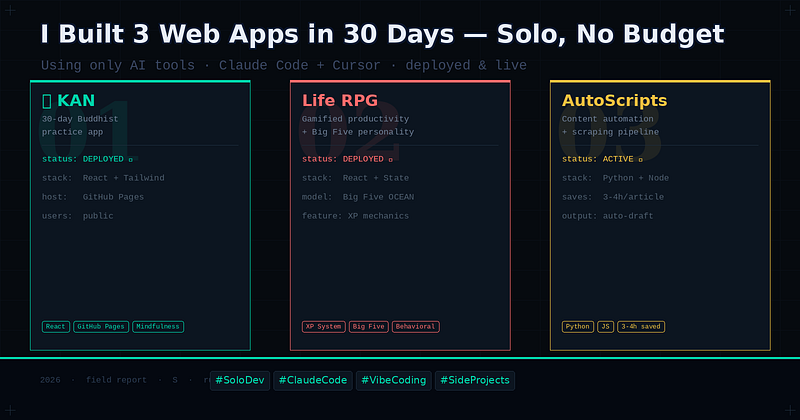
The Three Apps
1. 観 (KAN) — Buddhist-Inspired 30-Day Practice App A minimalist daily practice tracker drawing on Buddhist philosophy. Users move through 30 days of reflection prompts, each tied to a concept from Zen and Theravāda thought. Built for mobile-first, deployed on GitHub Pages. → Live: johnpascualkumar077.github.io/kan/
2. Life RPG Dashboard A productivity gamification tool that assigns XP to daily tasks, tracks streaks, and maps behavior patterns against a Big Five personality model. The idea: make habit formation feel like leveling up a character — because for certain cognitive styles, it works.
3. Content Automation Scripts A set of Python and JS scripts for scraping AI tool release pages, formatting article drafts, and automating social media cross-posting. Not glamorous. But it saves 3–4 hours per article cycle.
The Actual Workflow
Every app followed the same four-stage loop:
Stage 1 — Spec in plain English (15 min) I write a single document describing what the app does, who uses it, and what “done” looks like. No wireframes. No Figma. Just a text file.
Stage 2 — Scaffold with Claude Code (30–60 min) Claude Code reads the spec and generates the initial file structure, core logic, and component hierarchy. For KAN, this was the entire React scaffold in one session. For the RPG dashboard, it was the XP calculation engine and state management.
Stage 3 — Iterate with Cursor (variable) UI details, responsive layout, edge cases — I use Cursor’s inline autocomplete here. The codebase is small enough at this stage that context degradation isn’t a problem.
Stage 4 — Deploy and test live (15 min) GitHub Pages for static apps. Zero cost. The first live test always reveals 2–3 issues that didn’t appear locally. I fix these in one Claude Code session.
Total time per app: 8–20 hours, spread over 3–5 days.
What AI Actually Changes
The honest answer is not “everything.” It’s something more specific: AI eliminates the cost of starting.
Before AI tools, starting a new app meant 2–3 hours of environment setup, boilerplate, and architecture decisions before writing a single line of meaningful code. That friction was real, and it killed a lot of ideas before they began.
With Claude Code and Cursor, the cost of “let me try this” dropped to near zero. You write the spec, you run the scaffold, you have something working in an hour. Whether it’s worth continuing becomes a much cleaner decision.
This is especially true for solo developers. No standups. No PRs. No waiting. The feedback loop compresses dramatically.
What AI Doesn’t Change
Three things remain entirely on the human side:
Judgment about what to build. The tools have no taste, no market sense, no understanding of what’s useful. KAN exists because I’ve been studying Buddhist philosophy for years and saw a gap. The RPG dashboard exists because I’ve been reading behavioral economics and wanted to test an idea on myself. The AI executes the idea. The idea is still mine.
Quality of the spec. Garbage in, garbage out remains fully operational. The better you can describe what you want — with real constraints, real user behavior, real edge cases — the better the output. Writing a good spec is a skill Claude Code is making more valuable, not less.
Debugging the weird stuff. When something breaks in an unexpected way — a race condition, a state management bug that only appears after 10 user interactions — the AI helps, but you still need to understand the problem. The tools compress the work; they don’t replace the thinking.
The Stack
Everything below is either free or already in my existing subscription:
- Claude Code — scaffold, refactoring, complex debugging
- Cursor — UI iteration, inline autocomplete
- GitHub Pages — hosting (free)
- Bolt.new — rapid prototyping for throwaway experiments
- Python — automation scripts
- React + Tailwind — frontend standard
Monthly tool cost: covered by my existing Claude Pro and Cursor subscription. No additional spend.
The Real Lesson
Shipping three apps in 30 days is not impressive because of the output. It’s interesting because of what it reveals about the bottleneck.
The bottleneck was never skill. It was activation energy — the cost of starting, the fear of the blank file, the overhead of setup and scaffolding. AI tools destroyed that bottleneck.
What’s left is the harder, more human problem: deciding what to build, and finishing it.
Those two things haven’t changed at all.
Building AI-powered tools and looking for developer-focused sponsors? I publish weekly reviews and field reports from a solo dev in Japan. Reach out via Medium or visit johnpascualkumar077.github.io/portfolio/
Tags: AI Tools Web Development Solo Developer Claude Code Productivity Vibe Coding Side Projects

コメント